Forum Discussion

Wojciech_Plonka
Feb 17, 2021Copper Contributor
Conditional formatting based on a field below
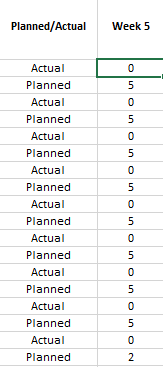
Hi, I have the following table: Each actual value is relating to the "Planned" value below. I would like each "Actual" value to have a red colour if the planned value is 0 or green if the n...

mathetes
Feb 17, 2021Gold Contributor
Absolutely there are ways to do it.
If I were you, however, I'd put the cells side-by-side if you can. Makes it easier, and probably would make more sense design wise.
Anyway, here's an example. I used a random number generator just to put it through its paces. To get a whole new set of numbers, just activate the F9 key. With a mac that's done by holding the Fn key and pressing the key along the top row with F9 appearing on it.