Forum Discussion

Conditional formatting based on a field below
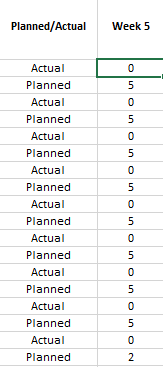

 Wojciech_PlonkaFeb 18, 2021Copper Contributor
Well, the trick is - there will be thousands of rows like this, so setting this up manually would be a hell, also, changing format is impossible unfortunately
PhilipTx mathetes peteryac60- PhilipTxFeb 18, 2021Copper Contributor
Yes, my solution would probably only work in a limited environment and was a basic attempt to understand your issue. If you apply the rule itself to the first rows you just got just replicate the format. I can then only recommend to try a solution with visual basics. I used that in certain applications.
Example for visual basics:
Sub Kontrollkästchen61_Klicken()
If ActiveSheet.Shapes("Kontrollkästchen 61").OLEFormat.Object.value = 1 Then
Range("M67").Interior.ColorIndex = 6Else
Range("M67").Interior.ColorIndex = xlNoneEnd If
ganzeZeile
End Sub
Sub Kontrollkästchen62_Klicken()
If ActiveSheet.Shapes("Kontrollkästchen 62").OLEFormat.Object.value = 1 Then
Range("N67").Interior.ColorIndex = 6Else
Range("N67").Interior.ColorIndex = xlNoneEnd If
ganzeZeile
End Sub
Sub Kontrollkästchen63_Klicken()
If ActiveSheet.Shapes("Kontrollkästchen 63").OLEFormat.Object.value = 1 Then
Range("O67").Interior.ColorIndex = 6Else
Range("O67").Interior.ColorIndex = xlNoneEnd If
ganzeZeile
End Sub
Sub ganzeZeile()If ActiveSheet.Shapes("Kontrollkästchen 61").OLEFormat.Object.value = 1 And ActiveSheet.Shapes("Kontrollkästchen 62").OLEFormat.Object.value = 1 And ActiveSheet.Shapes("Kontrollkästchen 63").OLEFormat.Object.value = 1 Then
Range("A66:L68").Interior.ColorIndex = 6
Else
Range("A66:L68").Interior.ColorIndex = xlNone
End If
End SubThere are likely more elegant or sophisticated approaches for this, but that would be a way to adress your issue. In future Excel will open up even further.