Forum Discussion

Conditional Formatting applying to old columns when new columns are copied and inserted.
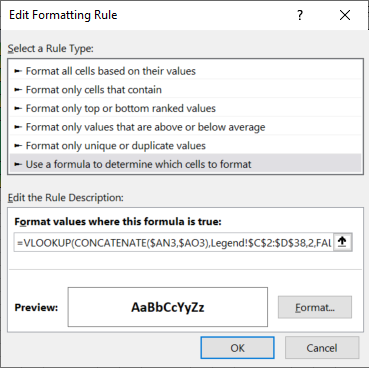


Please go back to the workbook that I attached. You have somehow managed to completely mess up the rules.
- HansVogelaarJun 15, 2021MVP
I'm afraid I don't have a solution for you, sorry!
- milo1234Jun 15, 2021Brass ContributorHi Hans, so is there no way around this issue?
- HansVogelaarJun 11, 2021MVP
I see the problem, but the only conclusion I can draw is that Excel can't handle formatting so many cells. The problem only occurs in some rows of some columns. I have checked the formulas; they return the correct values for the problem cells and yet Excel applies the rules incorrectly...
- HansVogelaarJun 11, 2021MVP
I'll look at it when I get back.
- milo1234Jun 11, 2021Brass Contributor
HansVogelaar No problem, please find attached, thanks.
- HansVogelaarJun 11, 2021MVP
- milo1234Jun 11, 2021Brass Contributor
- HansVogelaarJun 11, 2021MVP
- milo1234Jun 11, 2021Brass ContributorAh I understand, apologies. I've managed to get it working, however when I change a rating to F1, T1 from the workbook you attached, this does not change to the colour to green.
- HansVogelaarJun 11, 2021MVP
I3 must be the active cell in the selection when you create the rules. In your most recent workbook, this is what I see if I select Manage Rules and edit one of the rules:
=IF(MOD(COLUMN(XDW3),3)<>2,VLOOKUP(CONCATENATE(OFFSET(XDW3,0,-MOD(COLUMN(XDW3),3)),OFFSET(XDW3,0,1-MOD(COLUMN(XDW3),3))),Legend!$G$2:$H$38,2,FALSE)="Blank")
As you see, it does not refer to I3 but to XDW3.
- milo1234Jun 11, 2021Brass ContributorI don't understand how?
I've changed the formatting to follow these 6 rules:
=IF(MOD(COLUMN(I3),3)<>2,VLOOKUP(CONCATENATE(OFFSET(I3,0,-MOD(COLUMN(I3),3)),OFFSET(I3,0,1-MOD(COLUMN(I3),3))),Legend!$B$2:$C$38,2,FALSE)="Blank")
=IF(MOD(COLUMN(I3),3)<>2,VLOOKUP(CONCATENATE(OFFSET(I3,0,-MOD(COLUMN(I3),3)),OFFSET(I3,0,1-MOD(COLUMN(I3),3))),Legend!$B$2:$C$38,2,FALSE)="R")
=IF(MOD(COLUMN(I3),3)<>2,VLOOKUP(CONCATENATE(OFFSET(I3,0,-MOD(COLUMN(I3),3)),OFFSET(I3,0,1-MOD(COLUMN(I3),3))),Legend!$B$2:$C$38,2,FALSE)="AR")
=IF(MOD(COLUMN(I3),3)<>2,VLOOKUP(CONCATENATE(OFFSET(I3,0,-MOD(COLUMN(I3),3)),OFFSET(I3,0,1-MOD(COLUMN(I3),3))),Legend!$B$2:$C$38,2,FALSE)="A")
=IF(MOD(COLUMN(I3),3)<>2,VLOOKUP(CONCATENATE(OFFSET(I3,0,-MOD(COLUMN(I3),3)),OFFSET(I3,0,1-MOD(COLUMN(I3),3))),Legend!$B$2:$C$38,2,FALSE)="AG")
=IF(MOD(COLUMN(I3),3)<>2,VLOOKUP(CONCATENATE(OFFSET(I3,0,-MOD(COLUMN(I3),3)),OFFSET(I3,0,1-MOD(COLUMN(I3),3))),Legend!$B$2:$C$38,2,FALSE)="G")
and ensured the 'Applies To' field reflects the data range from column I onwards.