Forum Discussion

Conditional Formatting applying to old columns when new columns are copied and inserted.
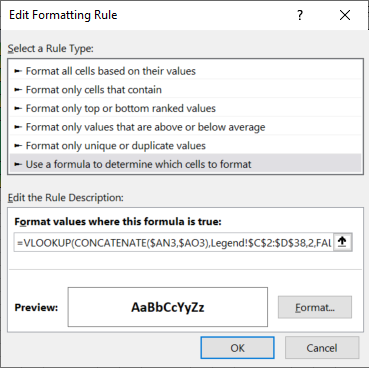

See if this works better for you. I replaced all rules with a set of 6 rules for the entire range.

Please can you explain the logic around this?
Will it only work if the column A is locked?
- HansVogelaarJun 11, 2021MVP
The formula refers to A3, not to $A3, so Excel will dynamically adjust it in other columns.
The formula first uses MOD(COLUMN(...),3) to check whether the cell is in a column that is to be formatted conditionally.
If so, it uses OFFSET in combination with MOD(COLUMN(...),3) to determine the two cells to be concatenated. For a cell in column A (or D or G etc.), it is the cell itself and the cell to the right.
For a cell in column B (or E or H etc.) is the cell itself and the cell to the left.
This makes the formula much more dynamic.
- milo1234Jun 11, 2021Brass Contributor
This is the layout of my spreadsheet and I have attempted to use your 6 rule, however this is not working. Please can you apply to the layout attached and I will mark as best response. Thank you Hans
- HansVogelaarJun 11, 2021MVP
Originally, the range to be formatted began in column A = column 1. 1 = 1 Mod 3.
Now it begins in column I = column 9. 9 = 0 Mod 3.
So everything shifts.
- milo1234Jun 11, 2021Brass Contributor
Thank you - this makes sense.
I have applied the formulas to the last column, however there are only a few cells which it does not apply to. Please find attached.