Forum Discussion

Conditional formatting - new rule based on two related column headings
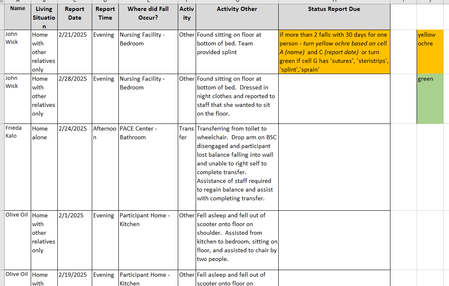

Added two conditional formatting for column H. Green supersedes yellow, i.e. if the conditions for both yellow and green are met, green takes precedence. Example with John Wick:
First fall is green because the condition for green is met although he fell twice within 30 days which should give him yellow.
Second fall is yellow because only the condition for yellow is met.

Thank you for this! It's been very helpful for the green fill.
I am trying to apply the formula and substituting the applicable cells - but it does not seem to work.
=AND(XLOOKUP(B1,B:B,G:G,,0,-1)-XLOOKUP(B1,B:B,G:G,,0,1)>0,XLOOKUP(B1,B:B,G:G,,0,-1)-XLOOKUP(B1,B:B,G:G,,0,1)<=30)
I cannot get it to work.
- ScottAngMar 11, 2025Brass Contributor
The formula for yellow expects the dates to be in ascending order, as that is how the dates are in your previous file. In your latest file, the dates are in descending order. I have modified the formula accordingly. Also, I have moved the CF for green to the top, assuming green should supersede yellow when conditions for both colors are met for the same row.