Forum Discussion

and_rogynous
May 11, 2023Tin Contributor
Conditional Formatting - Based on Blank Cells, Cell Contents, and More...
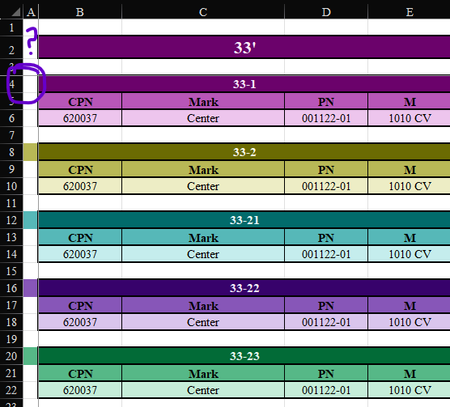
I have a worksheet where I list all our customer's orders for boat parts. There are tables for each boat size (on the Tables tab), and those are referenced to then make tables for each specific boat....

HansVogelaar
May 11, 2023MVP
I don't even begin to understand your conditional formatting formulas.
For A4:A4000, use
=MOD(COUNTA($B$4:$B4),36)=1
=MOD(COUNTA($B$4:$B4),36)=4
...
=MOD(COUNTA($B$4:$B4),36)=34
The 36 is because each "table" has 3 rows: 3*12=36.
The number at the end of the rules increases by 3.
For F4:F4000 use:
=MOD(COUNTA($G$4:$G4),84)=1
=MOD(COUNTA($G$4:$G4),84)=8
...
=MOD(COUNTA($G$4:$G4),84)=78
The 84 is because each "table" has 7 rows: 7*12=84.
The number at the end of the rules increases by 7.
And similar for larger "tables".