Forum Discussion

Conditional format blank cell based on how many days past date in another cell
- Jul 06, 2023


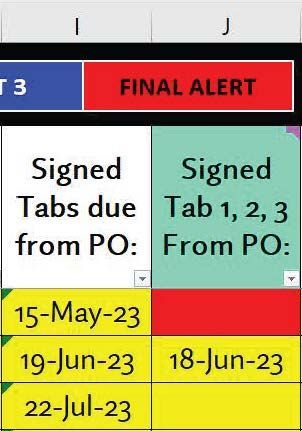
NikolinoDE Can you help me as well? I need almost the same formula, except I need the blank cell to highlight if it has not been filled in within 3 days of the date in the previous cell (or rather, if today is 3 days or more past the date in the previous cell). I can't figure out how to add in the 3 days parameter. I'd also like the whole row to highlight rather than just the singular cell.
- NikolinoDEJul 17, 2023Platinum ContributorIf I understand correctly... which is not always the case :)), this formula might help you.
=AND($I3<TODAY()-3, ISBLANK(J3))
If not, please add more information, such as a step-by-step (cell by cell) description of your project, Excel version, operating system, storage medium, etc. Preferably with a file (without sensitive data) or photos.- conditionalheadacheJul 21, 2023Copper Contributor
NikolinoDE I believe you did understand correctly! However, I'm having an issue that the formula doesn't seem to work if I input a date of 7/10/23 or after? In my screenshot below, you can see where the formatting does correctly color most of the blank spaces as green correctly. However, the last two blanks should have turned green as well because they're overdue, and yet they remain unchanged.
Here's a screenshot of the formula I copy/pasted in case you can see anything I did wrong there.
Maybe I am misunderstanding how the formula should work? For example, if column K has a due date of 7/21/23, column L "Date Assigned" should have turned green 3 days ago by 7/17/23. Do I just have one of my math functions wrong in this?
Thank you for all your help on this, I was completely lost trying to figure it out on my own.
- NikolinoDEJul 25, 2023Platinum Contributor
=IF(AND(TODAY()-B1>3,C1<>""),TRUE,FALSE)