Forum Discussion

Complex formulae with data model
- Mar 27, 2026
So far i can see and know you’re definitely on the right track, moving this into the Data Model — that’s exactly the kind of scenario where Power Pivot really starts to pay off in both performance and maintainability.
What your Excel formula is doing is essentially checking:
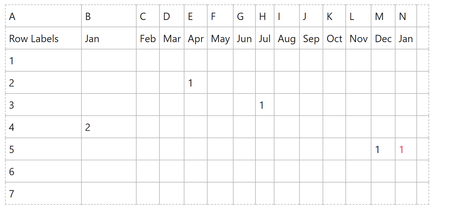
“Has this row already had a value in any previous month? If yes, don’t count it again.”
In the Data Model, rather than replicating that exact formula pattern, the more natural (and efficient) approach in DAX is to reframe the logic slightly:
Identify the first month where a value exists, and only count that occurrence.
Assuming your data is structured with one row per record per month (i.e., a proper “long” format), you could approach it like this:
1. Calculate the first month with a value per row/entity
FirstMonth :=
CALCULATE (MIN ( 'Table'[Month] ),
FILTER (ALLEXCEPT ( 'Table', 'Table'[ID] ),
'Table'[Value] > 0))2. Then create a measure to count only that first occurrence
CountOnce :=
IF (MAX ( 'Table'[Value] > 0 ) &&
MAX ( 'Table'[Month] ) = [FirstMonth],1,0)This way, the “red 1” you highlighted naturally drops out of the calculation, because it’s not the first occurrence for that row.
A couple of additional thoughts that might help:
- If your current structure still has months as columns (Jan, Feb, Mar…), it’s worth unpivoting that in Power Query — DAX works much more cleanly and efficiently with a normalized model.
- Measures (rather than calculated columns) will usually give you better flexibility if you’re reporting in PivotTables or Power BI.
Overall, you’re absolutely heading in the right direction — moving this logic into the model instead of worksheet formulas is exactly how you keep things scalable as your dataset grows.
My answers are voluntary and without guarantee!
Hope this will help you.
Was the answer useful? Mark as best response and like it!
This will help all forum participants.

So far i can see and know you’re definitely on the right track, moving this into the Data Model — that’s exactly the kind of scenario where Power Pivot really starts to pay off in both performance and maintainability.
What your Excel formula is doing is essentially checking:
“Has this row already had a value in any previous month? If yes, don’t count it again.”
In the Data Model, rather than replicating that exact formula pattern, the more natural (and efficient) approach in DAX is to reframe the logic slightly:
Identify the first month where a value exists, and only count that occurrence.
Assuming your data is structured with one row per record per month (i.e., a proper “long” format), you could approach it like this:
1. Calculate the first month with a value per row/entity
FirstMonth :=
CALCULATE (MIN ( 'Table'[Month] ),
FILTER (ALLEXCEPT ( 'Table', 'Table'[ID] ),
'Table'[Value] > 0))
2. Then create a measure to count only that first occurrence
CountOnce :=
IF (MAX ( 'Table'[Value] > 0 ) &&
MAX ( 'Table'[Month] ) = [FirstMonth],1,0)
This way, the “red 1” you highlighted naturally drops out of the calculation, because it’s not the first occurrence for that row.
A couple of additional thoughts that might help:
- If your current structure still has months as columns (Jan, Feb, Mar…), it’s worth unpivoting that in Power Query — DAX works much more cleanly and efficiently with a normalized model.
- Measures (rather than calculated columns) will usually give you better flexibility if you’re reporting in PivotTables or Power BI.
Overall, you’re absolutely heading in the right direction — moving this logic into the model instead of worksheet formulas is exactly how you keep things scalable as your dataset grows.
My answers are voluntary and without guarantee!
Hope this will help you.
Was the answer useful? Mark as best response and like it!
This will help all forum participants.
 Alexis_PiperMar 27, 2026Tin Contributor
Thank you so much- with your help along with Olufemi7 I have sorted it!! So happy!!