Forum Discussion

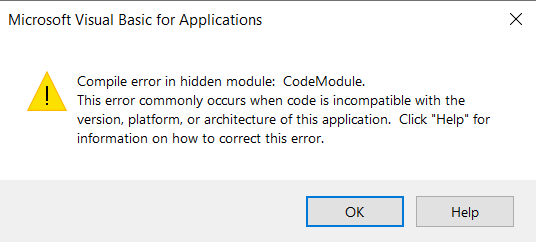
Compile error in hidden module: CodeModule.
Hi,
When I open an Excel file with macros and try to edit, it always shows me the message "Compile error in hidden module: CodeModule." and I can not edit the file. I can open this file in any other machine with windows.
My laptop is a brand new Dell latitude 9510, with windows and office 365 freshly installed.
All the updates have been done in windows.
Please help me as this is part of my daily routine and I can not work with this new laptop this way.
Thanks!
6 Replies
- PeterBartholomew1Silver Contributor
When you say 'try to edit', is it the worksheet formulas that you are trying to edit or the VBA?
What you need is to have the code window open in order to see the module that is failing. This is a blind guess but it might be that your new machine is set up to run 64 bit Office but VBA code is trying to call 32 bit libraries.
 davidsierramCopper Contributor
I am working with a Macro-enabled Excel file, is the worksheet that I try to edit. When I open the file, I get the error window (attached), then click "OK". Then I click in my macros icons in my Excel file and the same error window pops-up.
In my old laptop, every time It opens normally. And its not so old, Corei7-6600U and Win 10 64bits. And this excel file runs perfectly in all my other work colleagues laptops.
I don't know how to enter into that code window you are talking about, but I will find out.Thanks for the reply!
- PeterBartholomew1Silver Contributor
I am not thinking of anything exotic. Just the developer tab and click Visual Basic or Alt+F11 to open the VBA code window. As long as the project is not password protected, you should be able to look through the code.