Forum Discussion

comparing cell values to determine which is highest, then returning the name assocaited with it
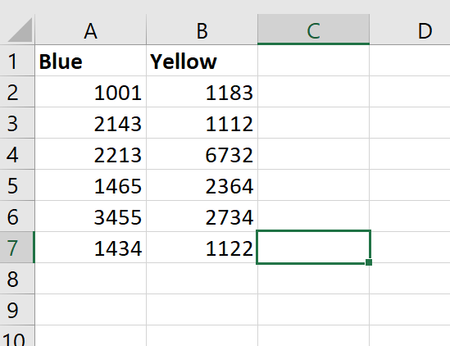

Hey, Thanks for taking the time to look at this, for me.
I'm not sure your solution is correct. I changed the blue to a lower value than the yellow, and it returned no winner each time, instead of yellow
As for part 2, it is essentially the same problem, however it is looking at an aggregate of numbers, rather than just one number to compare. To reword it, instead of 1,2 lets call them Q1, Q2, Q3, Q4 of a year for example. I want to look at what the average 'Blue' number was in say 'Q1' going back in time, and compare that against its 'Yellow' counterpart to determine which is higher/lower.
So in the image above, I've highlighted Q1 for the sake of ease. so in cell D1, it would just be the winner between B2 and C2, which is Blue (and loser in the opposite condition). when we get to cell D6, it would then be the mean average of B2 and B6 vs the mean average of C2 and C6. Then in cell D10, it would be the average of B2, B6 and B10, vs C2, C6, C10 ad nauseam.
Do let me know if that makes more sense, and thanks again for your time on this!

In general, better if you attach your sample file to the post together with screenshorts - you'll save time for the people who are answering on generating new test file copying your data from the screen into Excel sheet.
- kemble999Oct 09, 2019Copper ContributorNoted, Thanks