Forum Discussion

b-coronado
Jan 25, 2022Copper Contributor
Compare data across different sheets, return value where match
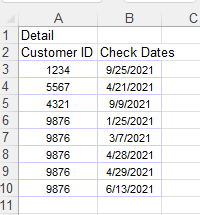
Sheet 1 has duplicative data noted here: Sheet 2 is trying to indicate if a check occurred in each month. I of course placed the 'X' in manually but have 2771 rows to view. I've googled and do...
- Jan 25, 2022
b-coronado I'd suggest you use a pivot table for this purpose. Demonstrated in the attached file. It use some of Excel's built-in time intelligence and counts the number of ID per date, grouped by month. No problem to do this on 2771 rows of data. It might take two seconds to generate the pivot table.


alannavarro
Jan 25, 2022Iron Contributor
Hello, attached is an excel file with an example. I did this using power query...
You just need to input your information in the blue table and then go to Data > Refresh all. (like a pivot table)
Hope it works!