Forum Discussion

Combining IFS formulas
 Nov 10, 2026
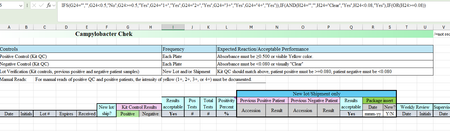
You can do it in one IF: test each column with OR, then join the two with AND. In I24:
=IF(AND(G24="",H24=""),"",IF(AND(OR(AND(ISNUMBER(G24),G24>=0.5),G24="1+",G24="2+",G24="3+",G24="4+"),OR(AND(ISNUMBER(H24),H24<0.08),H24="Clear")),"Yes","No"))
How it reads: if G24 and H24 are both empty, show nothing. Otherwise G passes if it is a number of 0.5 or more, or one of 1+, 2+, 3+, 4+. H passes if it is a number under 0.08, or Clear. It shows Yes only when both pass, and No otherwise.
The ISNUMBER parts keep the >=0.5 and <0.08 checks for numbers only, so a typed result like 1+ or Clear is judged only by its own text check.
If you'd rather leave I24 empty until both G and H are filled in, change the first AND to OR. And if you want a blank instead of No, replace "No" with "".
(Drafted with AI assistance; formulas tested before posting.)
You can do it in one IF: test each column with OR, then join the two with AND. In I24:
=IF(AND(G24="",H24=""),"",IF(AND(OR(AND(ISNUMBER(G24),G24>=0.5),G24="1+",G24="2+",G24="3+",G24="4+"),OR(AND(ISNUMBER(H24),H24<0.08),H24="Clear")),"Yes","No"))
How it reads: if G24 and H24 are both empty, show nothing. Otherwise G passes if it is a number of 0.5 or more, or one of 1+, 2+, 3+, 4+. H passes if it is a number under 0.08, or Clear. It shows Yes only when both pass, and No otherwise.
The ISNUMBER parts keep the >=0.5 and <0.08 checks for numbers only, so a typed result like 1+ or Clear is judged only by its own text check.
If you'd rather leave I24 empty until both G and H are filled in, change the first AND to OR. And if you want a blank instead of No, replace "No" with "".
(Drafted with AI assistance; formulas tested before posting.)