Forum Discussion

Combining Dynamic Arrays
- Nov 19, 2021
Sorry, I misunderstood. If we speak about "Low Non-Fixed Locations by Demand" or like, that's array of array. If modify, when with lambdas and supporting functions.
However, I'd modify a bit existing formulae. First, avoid using of INDIRECT() and define dynamic ranges with INDEX() instead. For example, W2# could be
=LET(
 zRangeL,  Inventory!Z2:INDEX( Z2:Z1000,Inventory!$Z$1 ),
 zRange,   Inventory!Z2:INDEX( Z2:Z1000,Inventory!$Z$1-1 ),
 aaRange,  Inventory!Z2:INDEX( AA2:AA1000, Inventory!$Z$1 - 1 ),
SORT(FILTER( aaRange, zRange >= LARGE( zRangeL, 45)),1,-1) )
Spills could be combined like in H2#
=LET(
   Part,      UNIQUE( FILTER( InvTable[ItemCode], InvTable[Zone Code]=J1)),
   Qty,       SUMIFS( InvTable[Quantity], InvTable[ItemCode], Part, InvTable[Zone Code],$J$1),
   ZOne,      SUMIFS( InvTable[Pallet], InvTable[ItemCode], Part, InvTable[Zone Code],$J$1),
   ZTwo,      SUMIFS( InvTable[Pallet],InvTable[ItemCode],Part,InvTable[Zone Code],$K$1),
   Projection, XLOOKUP( Part,InvTable[ItemCode],InvTable[Projection]),
 CHOOSE( {1,2,3,4,5}, Part, Qty, ZOne, ZTwo, Projection) )
Plus if no special reasons I'd don't use binary format, dynamic arrays are not optimized for it.
Please check attached.


DKoontz Hi,
> Is there a way to combine these arrays into one?
I am not sure my suggestion is what you need and since the attached file is not xlsx I cannot download it (security reasons) but to answer your question;
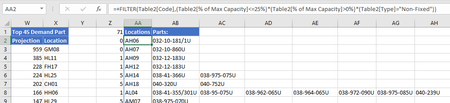
Yes - you have an anchor cell AA2 that can tell how many rows you need in the combined array.
You also know that demand is one column to the left (since I guess you may want to include them) and the items are one column to the right, equals width = 3 plus an unknown maximum number of items per DC/warehouse being at least one. This will catch only the first unless you change 3 to a number large enough to cover an expected maximum.
=OFFSET(AA2;0;-1;ROWS(AA2#);3)
The needed width of the combined array can be found by counting the number of items per DC;
A16 lists the unique combinations
=UNIQUE(FILTER(Table2[DC]:Table2[Code];Table2[% of Max Capacity]<=E2))
D16 visualizes the number of items per DC - this is not needed.
E16 finds the max number of items per DC
=LET(DCsWithItemsUnderLimit;INDEX(A16#;0;1);
output;MAX(COUNTIFS(DCsWithItemsUnderLimit;UNIQUE(DCsWithItemsUnderLimit)));
output
)
Using the calculated max no of items added to previous figure 3 (or change it to the actual no of columns to get a dynamic full width), the combined array including all items can look like
=LET(maxNoOfItems;E16;
anchorCell;AA2;
fullWidth;COLUMNS(Z2:AB2)-1+maxNoOfItems;
leftCol;OFFSET(anchorCell#;0;-1);
currentRegion;OFFSET(leftCol;0;0;;fullWidth);
currentRegion
)
And finally sort and delimit (if wanted)
=LET(maxNoOfItems;E16;
anchorCell;AA2;
fullWidth;2+maxNoOfItems;
leftCol;OFFSET(anchorCell#;0;-1);
currentRegion;OFFSET(leftCol;0;0;;fullWidth);
output;INDEX(SORT(currentRegion;;-1);SEQUENCE(AB23);SEQUENCE(;fullWidth));
output
)