Forum Discussion

Combining Dynamic Arrays
- Nov 19, 2021
Sorry, I misunderstood. If we speak about "Low Non-Fixed Locations by Demand" or like, that's array of array. If modify, when with lambdas and supporting functions.
However, I'd modify a bit existing formulae. First, avoid using of INDIRECT() and define dynamic ranges with INDEX() instead. For example, W2# could be
=LET(
 zRangeL,  Inventory!Z2:INDEX( Z2:Z1000,Inventory!$Z$1 ),
 zRange,   Inventory!Z2:INDEX( Z2:Z1000,Inventory!$Z$1-1 ),
 aaRange,  Inventory!Z2:INDEX( AA2:AA1000, Inventory!$Z$1 - 1 ),
SORT(FILTER( aaRange, zRange >= LARGE( zRangeL, 45)),1,-1) )
Spills could be combined like in H2#
=LET(
   Part,      UNIQUE( FILTER( InvTable[ItemCode], InvTable[Zone Code]=J1)),
   Qty,       SUMIFS( InvTable[Quantity], InvTable[ItemCode], Part, InvTable[Zone Code],$J$1),
   ZOne,      SUMIFS( InvTable[Pallet], InvTable[ItemCode], Part, InvTable[Zone Code],$J$1),
   ZTwo,      SUMIFS( InvTable[Pallet],InvTable[ItemCode],Part,InvTable[Zone Code],$K$1),
   Projection, XLOOKUP( Part,InvTable[ItemCode],InvTable[Projection]),
 CHOOSE( {1,2,3,4,5}, Part, Qty, ZOne, ZTwo, Projection) )
Plus if no special reasons I'd don't use binary format, dynamic arrays are not optimized for it.
Please check attached.

I guess you may XMATCH(Locations, InvTable[StorLocCode]), return Parts by INDEX with above and combine both arrays with IF or CHOOSE. Better with sample, above is just an idea if I understood correctly your case.

Attached a scrubbed and changed up sample but all methods are the same.
I tried:
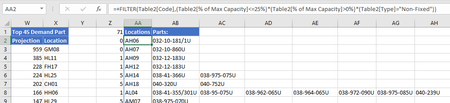
INDEX(InvTable[ItemCode],XMATCH(FILTER(Table2[Code],(Table2[% of Max Capacity]<=25%)*(Table2[% of Max Capacity]>0%)*(Table2[Type]="Non-Fixed")),InvTable[StorLocCode]))which returns the first part of each location specified, but if there are multiple parts in one location that gets left off. Not sure how to combine the arrays with choose.
Now that I'm thinking it through, the sum that I'm doing W2 is dependent on the AB formulas being distinct dynamic ranges. I'll play around with xmatch and see if I can come up with a better method.
Thanks for your help.
- SergeiBaklanNov 19, 2021Diamond Contributor
Sorry, I misunderstood. If we speak about "Low Non-Fixed Locations by Demand" or like, that's array of array. If modify, when with lambdas and supporting functions.
However, I'd modify a bit existing formulae. First, avoid using of INDIRECT() and define dynamic ranges with INDEX() instead. For example, W2# could be
=LET(
 zRangeL,  Inventory!Z2:INDEX( Z2:Z1000,Inventory!$Z$1 ),
 zRange,   Inventory!Z2:INDEX( Z2:Z1000,Inventory!$Z$1-1 ),
 aaRange,  Inventory!Z2:INDEX( AA2:AA1000, Inventory!$Z$1 - 1 ),
SORT(FILTER( aaRange, zRange >= LARGE( zRangeL, 45)),1,-1) )
Spills could be combined like in H2#
=LET(
   Part,      UNIQUE( FILTER( InvTable[ItemCode], InvTable[Zone Code]=J1)),
   Qty,       SUMIFS( InvTable[Quantity], InvTable[ItemCode], Part, InvTable[Zone Code],$J$1),
   ZOne,      SUMIFS( InvTable[Pallet], InvTable[ItemCode], Part, InvTable[Zone Code],$J$1),
   ZTwo,      SUMIFS( InvTable[Pallet],InvTable[ItemCode],Part,InvTable[Zone Code],$K$1),
   Projection, XLOOKUP( Part,InvTable[ItemCode],InvTable[Projection]),
 CHOOSE( {1,2,3,4,5}, Part, Qty, ZOne, ZTwo, Projection) )
Plus if no special reasons I'd don't use binary format, dynamic arrays are not optimized for it.
Please check attached.
- DKoontzNov 19, 2021Steel Contributor
This is EXACTLY what I was wondering was possible. Using LET() to define all of the separate ranges then combining them with CHOOSE() makes a lot sense. Looks like this helped the calculation speed a bit too.
I'll definitely start incorporating this regularly and playing around with it a bit more. I really should use index more, indirect is my go to for situations like this but index has much more flexibility.
=LET(k, SEQUENCE( ROWS($T$2#) ), IFERROR( SUM( XLOOKUP( AB2#, INDEX($T$2#,k,1), INDEX($T$2#,k,2) ) ),"") )This is really interesting, using the sequence as your lookup and return array is not something that I would have thought possible.
Thank you so much!
Also I like the spaces after calling a function, very clean 🙂- SergeiBaklanNov 20, 2021Diamond Contributor
DKoontz , you are welcome, thank you for the feedback.