Forum Discussion

JStroyer
Jan 02, 2023Copper Contributor
How to make a list from an excel spreadsheet with many columns
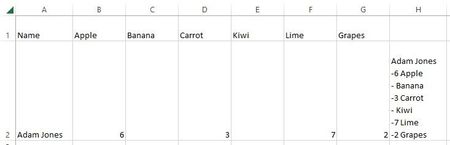
Hi, I have an excel spreadsheet with results from an order form. I'm trying to get a formula to format each line into a list showing exactly what each person purchased. I was using the CONCATENATE ...
- Jan 03, 2023
You need a different kind of formula in Excel 2016. TEXTJOIN is not available there. Try this:
=A2&IF(B2="","",CHAR(10)&"- "&B2&" "&B$1)&IF(C2="","",CHAR(10)&"- "&C2&" "&C$1)&IF(D2="","",CHAR(10)&"- "&D2&" "&D$1)&IF(E2="","",CHAR(10)&"- "&E2&" "&E$1)&IF(F2="","",CHAR(10)&"- "&F2&" "&F$1)&IF(G2="","",CHAR(10)&"- "&G2&" "&G$1)


JStroyer
Jan 02, 2023Copper Contributor
Detlef_Lewin Thanks for your help! I tried this but it didn't work for me. I've never used the TEXTJOIN formula, is this in conjunction with the one i had posted above or should this give me what i need including eliminating anything that is blank? Sorry, not well versed in Excel formulas!

Detlef_Lewin
Jan 02, 2023Silver Contributor
- JStroyerJan 03, 2023Copper ContributorSorry should have been more clear, its giving me the #NAME error. I'm using Excel 2016 so i believe thats why.