Forum Discussion

ldaines23
Feb 24, 2023Copper Contributor
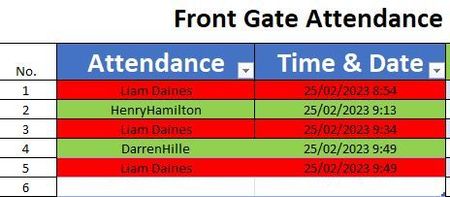
Changing colour of cells based on odd or even times text is shows up in column
Hi All, I'm trying to build an Attendance list for a job site. Employees will need to be scanned in and out each time they pass through the gate using a QR scanner which will list there name on ...

HansVogelaar
Feb 25, 2023MVP
Let's say you want top apply this to B2:C1000.
Select this range. The active cell in the selection should be in row 2 (i.e. either B2 or C2).
On the Home tab of the ribbon, click Conditional Formatting > New Rule...
Select 'Use a formula to determine which cells to format'.
Enter the formula
=AND($B2<>"", ISODD(COUNTIF($B$2:$B$1000, $B2)))
Click Format...
Activate the Fill tab.
Select green.
Click OK, then click OK again.
Repeat these steps, but with the formula
=AND($B2<>"", ISEVEN(COUNTIF($B$2:$B$1000, $B2)))
and red as color.
 ldaines23Feb 25, 2023Copper Contributor
Thanks mate works great! Cheers.