Forum Discussion

chamseddine_hamdeni
Sep 02, 2021Copper Contributor
Change one character within a formula
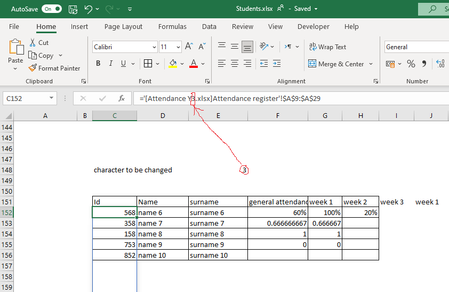
Hello, I have a question in EXCEL I have a formula and I want to change only one character within this formula to be referenced in another cell. I mean when I change the cell value with a new chara...

HansVogelaar
Sep 02, 2021MVP
You can use INDIRECT for this:
=INDIRECT("'[Attendance Y" & C152 & ".xlsx]Attendance register'!$A$9:$A$29")
Warning: this will only work if the other workbook is open. INDIRECT cannot work with references to a closed workbook.

chamseddine_hamdeni
Sep 02, 2021Copper Contributor
So you mean that I cannot use indirect in my case ?
because i have many attendance workbooks (attendance y1 to attendance y13) and i cannot leave them always open.
because i have many attendance workbooks (attendance y1 to attendance y13) and i cannot leave them always open.
- HansVogelaarSep 02, 2021MVP
In that case, INDIRECT is not a good solution. Perhaps someone else will suggest a better method.