Forum Discussion

Oscar_Santos
Sep 01, 2021Copper Contributor
Change colors based on values of other cells
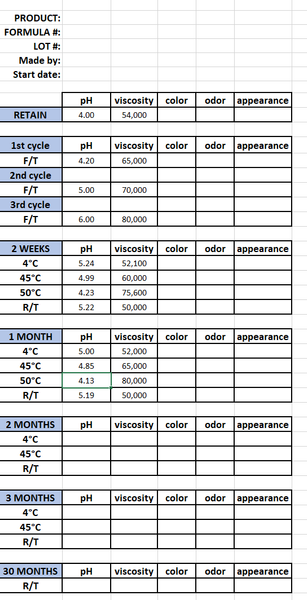
Hello, I need some help with excel. Below are images of the worksheet template I use. For every project, I start with a blank template and then input different values based on my testing, as can...

Juliano-Petrukio
Sep 02, 2021Bronze Contributor
Find attached

Oscar_Santos
Sep 02, 2021Copper Contributor
Thank you! This is very close to what I want! Can you explain how I can change the range? Like, lets say I want it to be a difference of 2.0 instead, as in, if the RETAIN value for pH is 4.0, it changes if it's 2.0 or 6.0? How do you I change that in the formula?
- Juliano-PetrukioSep 02, 2021Bronze Contributor
There are 2 Options
You change straight away in the formula
=AND(B12<>"";OR(B12<=B$9-YourFactorValue;B12>=B$9+YourFactorValue))
Or you can add the value in some column of the spreadsheet.
Find attached
 OscarDanielSantosSep 07, 2021Copper ContributorSorry to keep bothering you, I was trying to figure out how to change the formula itself but I couldn't figure it out. My current problem is that the values for Viscosity are much higher than pH. pH goes from a range of 1.0 - 12.0, while viscosity can be anywhere from 500 - 100,000. Can you please also add a reference value for viscosity aswell? I appreciate all the work you've done for me so far, it has been helping me tremendously.