Forum Discussion

Mr_Kirkeby
Apr 25, 2024Copper Contributor
Challenging Excel SUM.IF with filter
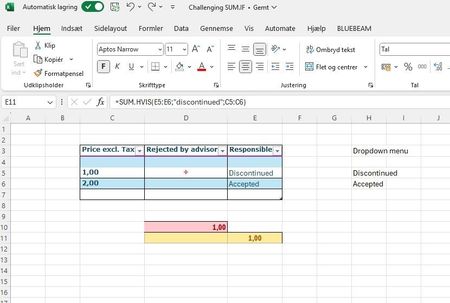
Hi community. I have trouble with filtering SUM.IF. If "÷" is shown in the coloumn "Rejceted by advisor", it is correct to add the specific number to cell D10. But If "÷" is shown in the ...
- Apr 25, 2024
Use SUM.HVISER. To sum the values for which column D contains ÷ and column E contains Discontinued:
=SUM.HVISER(C4:C7; D4:D7; "÷"; E4:E7; "Discontinued")
And to sum the values for which column D contains ÷ and column E does not contain Discontinued:
=SUM.HVISER(C4:C7; D4:D7; "÷"; E4:E7; "<>Discontinued")

HansVogelaar
Apr 25, 2024MVP
Use SUM.HVISER. To sum the values for which column D contains ÷ and column E contains Discontinued:
=SUM.HVISER(C4:C7; D4:D7; "÷"; E4:E7; "Discontinued")
And to sum the values for which column D contains ÷ and column E does not contain Discontinued:
=SUM.HVISER(C4:C7; D4:D7; "÷"; E4:E7; "<>Discontinued")