Forum Discussion

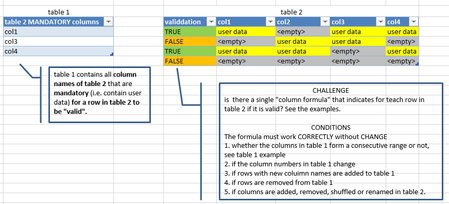
CHALLENGE: find column formula for validation of mandatory columns in a table with user data

Also, I'm not sure from where all the confusion/misunderstanding surrounding INDIRECT not processing an array derives. Even in legacy versions of Excel, that function is perfectly capable of processing an array: the example in the link you posted, for example, is solved by the simple insertion of the N function, i.e.
=SUM(N(INDIRECT(A1:A5)))
If the entries in A1:A5 are text, not numeric, then replace N with T (obviously in that case applying a SUM function would make little sense; nevertheless, the point remains that an array of returns is coerced). Even for a range comprising mixed datatypes it is possible to coerce the array appropriately.
Regards
- mtarlerFeb 04, 2023Silver Contributor
JosWoolley In a previous post, we found some odd behavior when using INDIRECT and ROW(). Personally I try to avoid INDIRECT as much as possible.
Detlef_Lewin I didn't go through your solution but I believe tomsuters needs a 'legacy' formula
tomsuters check the attached. you may need to use CSE (ctrl-shift-enter)
=SUM(
IF(ISNUMBER(MATCH(INDEX(Table2[#Headers],COLUMN($B$1:INDEX($1:$1,COLUMNS(Table2)))),Table1,0)),
--ISNUMBER(SEARCH("empty",INDEX(Table2,ROW()-ROW(Table2[#Headers]),COLUMN($B$1:INDEX($1:$1,COLUMNS(Table2)))))),
0))=0
I wasn't sure what <empty> meant so I took it literal and searched for "empty" as a "pass" and any pass would result in a FALSE but you could use ISBLANK instead of the ISNUMBER(SEARCH(... )) if it is actually blank like this:
=SUM(
IF(ISNUMBER(MATCH(INDEX(Table24[#Headers],COLUMN($B$1:INDEX($1:$1,COLUMNS(Table24)))),Table1,0)),
--ISBLANK(INDEX(Table24,ROW()-ROW(Table24[#Headers]),COLUMN($B$1:INDEX($1:$1,COLUMNS(Table24))))),
0))=0
I included both versions in the attached.
This all said, I have the new Excel with dynamic arrays and such so can't test if it will work in a legacy version of Excel.
- JosWoolleyFeb 04, 2023Iron Contributor
Yes, I already replied to that previous post.
As to the current problem, the following might be even simpler:
=SUM(N(INDEX(
    Table2[@[col1]:[col4]],
        N(IF(1, MATCH(Table1, Table2[[#Headers],[col1]:[col4]], 0)))
    ) = "")
) = 0
Regards
- mtarlerFeb 05, 2023Silver Contributoryes that is simpler but I think they required it to work if they added columns and I believe by defining [col1]:[col4] that when you add col5 it doesn't automatically get included. I have done solutions like that where I use [start]:[end] where start and end are 'dummy' columns and tell the user they must insert columns between them if they want them added in.
