Forum Discussion

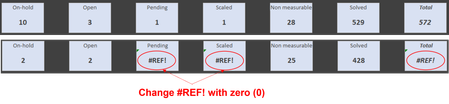
Catching the #REF bug!
- May 11, 2023
May be you can use the IFERROR function in Excel to capture the #REF! error and display a zero instead. Here's an example:
Let's say the cell with the pivot table value is A1. You can use the following formula to display a zero if the value in A1 results in #REF!:
=IFERROR(A1,0)
This formula will return the value in A1, unless it results in the #REF! error, in which case it will return a zero.
You can also nest the IFERROR function within other formulas if you need to perform additional calculations using the pivot table value. For example, if you need to add 1 to the pivot table value and then display a zero if the result is #REF!, you can use the following formula:
=IFERROR(A1+1,0)
This formula will add 1 to the value in A1, unless it results in the #REF! error, in which case it will return a zero.
I hope this helps!

Oh! God,
You are the best....!!!
Thank you so much.

I wish you continued success with Excel!
- ADumithMay 11, 2023Iron ContributorI have already overcome several challenges, now I face a new one.
I have posted another question in the community in this regard.
Thank you,