Forum Discussion

Cannot conditionally format based off of another row.
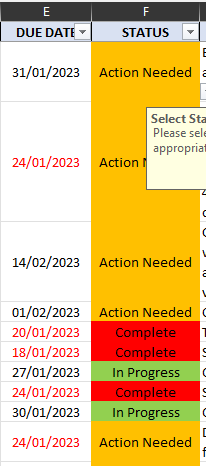


OliverScheurich Ok that has allowed the formula to go in but the date is still formatting as red when the status is "Complete".
Here is the current arrangement of conditional formats:
I have tried moving the order around and selecting and deselecting 'Stop if True' to see if it will change the font colour but nothing seems to work.
Basically I just need the date font to be red if on or past todays date (which is the part that is working) but I want it to change to black font colour once the status in the STATUS column is "Complete".
Any help that anyone can give is appreciated.
- OliverScheurichJan 27, 2023Gold Contributor
You can try these rules and "applies to" ranges which return the expected result if i correctly understand what is intended. Attached is my sample workbook. The screenshots show all rules and "applies to" ranges. The difference seem to be the "applies to" ranges and =$F1="Complete" instead of =$F2="Complete" and the hierarchy of =$F1="Complete" and <=$J$1.