Forum Discussion

Can we write a VBA Code, that automatically overwrites cells values of a formula on workbook close?
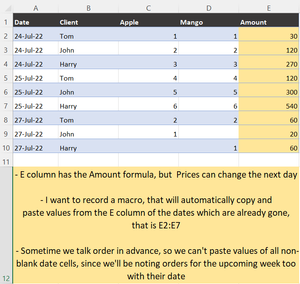
- Jul 25, 2022
In the Visual Basic Editor, double-click ThisWorkbook under Microsoft Excel Objects.
Copy the following code into the ThisWorkbook module:
Private Sub Workbook_BeforeSave(ByVal SaveAsUI As Boolean, Cancel As Boolean)
    Dim rng As Range
    With Worksheets("Data")
        For Each rng In .Range(.Range("A2"), .Range("A1").End(xlDown))
            If rng.Value <= Date Then
                With rng.Offset(0, 4)
                    .Value = .Value
                End With
            End If
        Next rng
    End With
End Sub
The code will run automatically each time you save the workbook (including when you close it and click Yes to the Save prompt).


PeterBartholomew1
Is it possible to create the static range inside the VBA instead of name manager in the event handler
beforesave?
Also, I tried reducing the static range by 7, but somewhere I am getting the syntax wrong
How do I correct this?

Once the named range has been used to define a Range Object in VBA , it has done its job. There is no further need for worksheet formulas. The number of rows currently in the range would be returned by
Range("StaticRange").Rows.Count
To resize or offset the range, the appropriately named methods can be used. Possible code lines might include
    Set rng = Range("StaticRange")
    n = rng.Rows.Count
    Set rng = rng.Resize(n - 2)
    rng.Value = rng.Value
    Set newTop = rng.Offset(n - 2).Resize(1)
    newTop.Name = "Top"
To store VBA values across workbook closure, you would need some form of persistent storage. Saving the file with revised defined names serves the purpose perfectly well. Moreover, if your user moves the data, the names move with the table whereas direct references or row numbers fail.