Forum Discussion

Priyanshu1325
Jul 09, 2022Copper Contributor
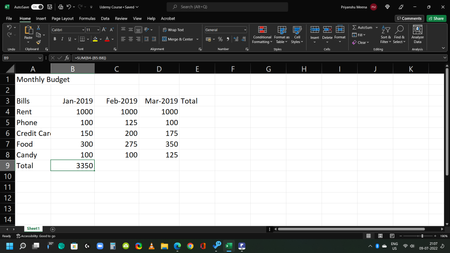
Can someone please explain how B9 is calculating this answer [Formula is (=SUM(B4-(B5:B8))]?
- Jul 09, 2022
Priyanshu1325 That would be 1000-100 + 1000-150 + 1000-300 + 1000-100 = 3350

Priyanshu1325
Jul 09, 2022Copper Contributor
Thank you very much. This was very helpful. Then how would I go about subtracting these cells? Is there any way to subtract like we add by just writing the first and last cell (eg. =SUM(B5:B9)?

Riny_van_Eekelen
Jul 09, 2022Platinum Contributor
- Priyanshu1325Jul 10, 2022Copper ContributorThank you for the reply. What I meant was is there a specific formula for subtraction in Excel. For example if we want to add cells B4 through B9 we can do it by [=SUM(B4:B9)] or [=B4+B5+B6+B7+B8+B9]. But if we want to subtract the same cells do we have to type =B4-B5-B6-B7-B8-B9 every time? Is there a way to write it concisely like the SUM formula for addition? What if have to subtract multiple rows or columns of cells, do we have type each one of them?
- Riny_van_EekelenJul 10, 2022Platinum Contributor
Priyanshu1325 Well then you have to enter the numbers in B5:B9 as negatives, and use SUM on the entire range B4:B9 or just the =B4-SUM(B5:B9) As I mentioned earlier.
- Priyanshu1325Jul 10, 2022Copper ContributorGot it. Thank you so much.