Forum Discussion

Calculation with pivot table column
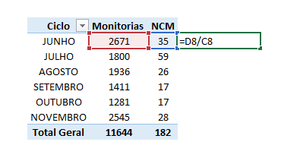

For example, if you want to add new columns to your pivot table or remove columns, it is often better to create a new table.
Open the document with the pivot table and click on the table.
Switch to the "PivotTable Analysis" tab.
Under “Data” click on the option “Change data source”.
If the source data is in the same document, select the option “Select table or range” and adjust the selection range.
If the data is stored in an external file, select the option "Use external data source" and click on "Select connection" to define an existing connection.
Finally click on "OK" to apply the changes.
Additional Information:
When to use Calculated Columns and Calculated Fields
Calculate values in a PivotTable
Hope I was able to help you with this info.
I know I don't know anything (Socrates)