Forum Discussion

Calculated Table causes performance issue and dataset refresh fails
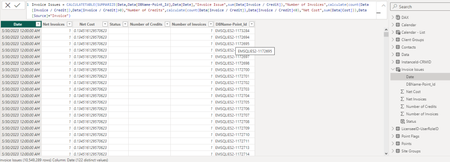
- Feb 20, 2024
First few general notes. You didn't disable Time Intelligence for the model
as result you have a lot of generated hidden date tables
which could significantly decrease of overall performance. Better to mark Calendar table as date one and use only it disabling Time Intelligence. However, on this step that could crash the model, if to do that when step by step.
Next, if you don't really need datetime use date Date data type instead. For your initial calculated table that decreases the refresh time on about 30%. Also, depends on how critical the precision is, better to use Fixed decimal number instead of Decimal number data type.
Back to calculated table I don't think we may avoid it. But the may decrease it a bit. First, creating explicit measures
which are obvious, like
0 number of Credits = CALCULATE(
    COUNTROWS(Data),
    Data[Source] = "Invoice",
    Data[Invoice / Credit] < 0
)
With that calculated table could be
CALCULATETABLE(
    DISTINCT(
        SELECTCOLUMNS( Data, Data[DBName-Point_Id], Data[Date] )
    ),
    Data[Source] = "Invoice"
)
with adding to it calculating column as in your variant
IF(
    [0 Number of Invoices] > 1
        && [0 Number of Invoices]
        > [0 Number of Credits],
    "Multiple Invoices",
    IF(
        [0 Number of Credits]
            > [0 Number of Invoices]
            && [0 Net Cost] <> 0,
        "Multiple Credits",
        IF(
            ISEVEN( [0 Invoice Issue] )
                && [0 Net Cost] <> 0,
            "Invoice-Credit Value Mismatch",
            IF(
                [0 Number of Credits]
                    = [0 Number of Invoices]
                    && [0 Net Cost] = 0,
                "Credit Cancels Invoice",
                BLANK( )
            )
        )
    )
)
Alternatively we may create the table with Status column from scratch
VAR selectData =
    DISTINCT(
        SELECTCOLUMNS( Data, Data[DBName-Point_Id], Data[Date] )
    )
RETURN
    CALCULATETABLE(
        ADDCOLUMNS(
            selectData,
            "Status",
                SWITCH(
                    TRUE( ),
                    [0 Number of Invoices] > 1
                        && [0 Number of Invoices] > [0 Number of Credits], "Multiple Invoices",
                    [0 Number of Credits] > [0 Number of Invoices]
                        && [0 Net Cost] <> 0, "Multiple Credits",
                    ISEVEN( [0 Invoice Issue] ) && [0 Net Cost] <> 0, "Invoice-Credit Value Mismatch",
                    [0 Number of Credits] = [0 Number of Invoices]
                        && [0 Net Cost] = 0, "Credit Cancels Invoice",
                    BLANK( )
                )
        ),
        Data[Source] = "Invoice"
    )
Both are in the model, I added only this visuals for them
DAX Studio shows bit better performance, but not critically. On the other hand on my PC all 3 variants work.
File is here TechComm - OneDrive (live.com)

First few general notes. You didn't disable Time Intelligence for the model
as result you have a lot of generated hidden date tables
which could significantly decrease of overall performance. Better to mark Calendar table as date one and use only it disabling Time Intelligence. However, on this step that could crash the model, if to do that when step by step.
Next, if you don't really need datetime use date Date data type instead. For your initial calculated table that decreases the refresh time on about 30%. Also, depends on how critical the precision is, better to use Fixed decimal number instead of Decimal number data type.
Back to calculated table I don't think we may avoid it. But the may decrease it a bit. First, creating explicit measures
which are obvious, like
0 number of Credits = CALCULATE(
    COUNTROWS(Data),
    Data[Source] = "Invoice",
    Data[Invoice / Credit] < 0
)
With that calculated table could be
CALCULATETABLE(
    DISTINCT(
        SELECTCOLUMNS( Data, Data[DBName-Point_Id], Data[Date] )
    ),
    Data[Source] = "Invoice"
)
with adding to it calculating column as in your variant
IF(
    [0 Number of Invoices] > 1
        && [0 Number of Invoices]
        > [0 Number of Credits],
    "Multiple Invoices",
    IF(
        [0 Number of Credits]
            > [0 Number of Invoices]
            && [0 Net Cost] <> 0,
        "Multiple Credits",
        IF(
            ISEVEN( [0 Invoice Issue] )
                && [0 Net Cost] <> 0,
            "Invoice-Credit Value Mismatch",
            IF(
                [0 Number of Credits]
                    = [0 Number of Invoices]
                    && [0 Net Cost] = 0,
                "Credit Cancels Invoice",
                BLANK( )
            )
        )
    )
)
Alternatively we may create the table with Status column from scratch
VAR selectData =
    DISTINCT(
        SELECTCOLUMNS( Data, Data[DBName-Point_Id], Data[Date] )
    )
RETURN
    CALCULATETABLE(
        ADDCOLUMNS(
            selectData,
            "Status",
                SWITCH(
                    TRUE( ),
                    [0 Number of Invoices] > 1
                        && [0 Number of Invoices] > [0 Number of Credits], "Multiple Invoices",
                    [0 Number of Credits] > [0 Number of Invoices]
                        && [0 Net Cost] <> 0, "Multiple Credits",
                    ISEVEN( [0 Invoice Issue] ) && [0 Net Cost] <> 0, "Invoice-Credit Value Mismatch",
                    [0 Number of Credits] = [0 Number of Invoices]
                        && [0 Net Cost] = 0, "Credit Cancels Invoice",
                    BLANK( )
                )
        ),
        Data[Source] = "Invoice"
    )
Both are in the model, I added only this visuals for them
DAX Studio shows bit better performance, but not critically. On the other hand on my PC all 3 variants work.
File is here TechComm - OneDrive (live.com)
 Excellove15Feb 26, 2024Iron Contributor
Hi SergeiBaklan
Many thanks for the wonderful explanation with amazing solutions!
This has worked for this report and increased the performance drastically!

As always you came to our rescue and thanks a lot again! especially screenshots you provided for auto generated date tables cautioned us to turn off the time intelligence!
We have also, put all your points into our guide so that we can refer in future!
I will mark this as the best response
As always, please let me know if i can do anything from my end as a gesture of thanks giiving
Thanks
- SergeiBaklanFeb 26, 2024Diamond Contributor
Thank you for the feedback, great to know that helped.