Forum Discussion

Calculated items issue in pivot table
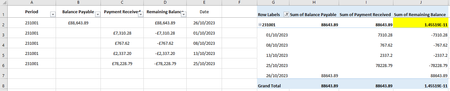

You need to explicitly round the formula in J2. Instead of =H2-I2, write =ROUND(H2-I2, 2).
Alternatively, explicitly the sums in H2 and I2.
If you are letting the Pivot Table do these calculations automatically, you need to replace them with a Calculated Field, where you enter the formula yourself.
-----
The infinitesimal difference arises because of binary arithmetic and Excel anomalies. In a nutshell, Excel represents decimal numbers in binary internally. Most decimal fractions cannot be represented exactly, so they must be approximated in binary. This gives rise to infinitesimal differences, which Excel does not always show. For example, =SUM(123.45,56.78,-180.23) displays 2.82E-14 when formatted as General. But =123.45+56.78-180.23 displays exactly zero.
 SanthoshKunderOct 26, 2023Iron ContributorDo you have more reading resources on this topic "Most decimal fractions cannot be represented exactly, so they must be approximated in binary"? Thanks in advance !
- JoeUser2004Oct 27, 2023Bronze Contributor
SanthoshKunder wrote: ``Do you have more reading resources on this topic``
Frankly, I do not recommend them. Almost everything online is unduly complicated, and they repeat a fundamental misunderstanding. In particular, they wrongly state that Excel "stores" 15 significant decimal digits of precision. To repeat: that is wrong.
I prefer my own simple, yet complete and accurate explanation. (wink)
Excel (and most applications) convert decimal numbers into an industry-standard binary form called 64-bit binary floating-point. IMHO, the details are unimportant. The important take-away is: numeric values are represented as the sum of 53 consecutive powers of 2 ("bits").
(The highest power of 2 depends on the magnitude of the number.)
Consequently, most decimal fractions (and integers greater than 9,007,199,254,740,992, which is 2^53) must be approximated.
For example, try to represent 0.1 as the sum of 53 consecutive powers of 2 starting with 2^(-4) = 1/16, the largest power of 2 less than 0.1.
(Caveat: Do not use Excel for that calculation. The results are misleading for the reasons below.)
Moreover, the binary approximation of a particular decimal fraction might vary, depending on the magnitude of the number. That is because some powers of 2 are used to represent the integer part, resulting in fewer powers of 2 to represent the decimal fraction.
That is why, for example, 10.1 - 10 = 0.1 returns FALSE(!). You can see why if you format 10.1 - 10 as Number with 16 decimal places.
As a consequence of these approximation limitations, simple binary arithmetic might result in infinitesimal differences from the decimal arithmetic that we might do manually.
Compare my explanation to MSFT's in "Floating-point arithmetic may give inaccurate results in Excel" (click here).
-----
Although Excel representation and arithmetic is not limited to 15 significant decimal digits, some Excel operations are.
In particular, when we enter a decimal number, Excel truncates the number after 15 significant digits, replacing any digits to the right with zeros.
(Note that this is an Excel limitation, not a limitation of the 64 BFP standard, as MSFT documentation claims. In contrast, VBA interprets all digits correctly.)
And when Excel displays a decimal number, it rounds to 15 significant digits, replacing any decimal places to the right with zero.
Finally, when Excel compares numeric values with the comparison operators (=, <>, >=, etc), it internally rounds each operand to 15 significant digits just for the purpose of the comparison.
In contrast, match and lookup functions compare the exact binary values.
And for simple formulas (not subexpressions) that end with subtracting a value (or adding a negative value) that have a final result that is "close to zero" (purposely vague), Excel might arbitrarily replace the actual arithmetic result with exactly zero.
Those last two Excel-specific anomalies give rise to inconsistencies. For example, A1=A2 might be TRUE, but A1-A2=0 and ISNUMBER(MATCH(A1,A2,0)) might be FALSE. Likewise, =A1-A2 might display exactly zero, but again A1-A2=0 is FALSE; and A1=A2 might also be FALSE.