Forum Discussion

anupambit1797
Jan 31, 2025Steel Contributor
Calculate the time difference with a specific criteria
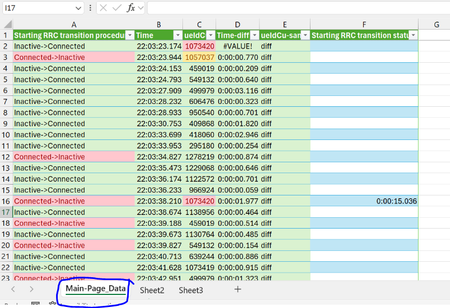
Dear Experts, I have a data like below in the Worksheet "Main-Page_Data" :- Column "A" -> can have only 2 values Inactive->Connected OR Connected->Inactive Column "...
- Jan 31, 2025
Here is an option that I think will work in legacy versions but not sure and may require ctrl-shift-enter:
=IFERROR([@Time]-1/(1/SUMPRODUCT(MAX([Time]*([Time]<[@Time])*([ueIdCu]=[@ueIdCu])*([Starting RRC transition procedure]<>[@[Starting RRC transition procedure]])))),"")NOTE: this version does not provide that added warning when the prior entry is the same procedure as the current.

anupambit1797
Jan 31, 2025Steel Contributor
Thanks m_tarler , may I ask to provide a solution with normal legacy functions? LET is really powerful function and I am still digesting it.. or any PQ with the UI steps?
Thanks & Regards
Anupam Shrivastava

m_tarler
Jan 31, 2025Silver Contributor
Here is an option that I think will work in legacy versions but not sure and may require ctrl-shift-enter:
=IFERROR([@Time]-1/(1/SUMPRODUCT(MAX([Time]*([Time]<[@Time])*([ueIdCu]=[@ueIdCu])*([Starting RRC transition procedure]<>[@[Starting RRC transition procedure]])))),"")NOTE: this version does not provide that added warning when the prior entry is the same procedure as the current.