Forum Discussion

anupambit1797
Jan 31, 2025Steel Contributor
Calculate the time difference with a specific criteria
Dear Experts, I have a data like below in the Worksheet "Main-Page_Data" :- Column "A" -> can have only 2 values Inactive->Connected OR Connected->Inactive Column "...
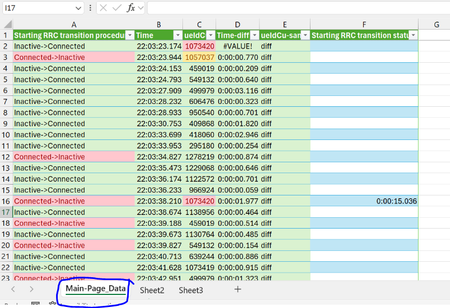
- Jan 31, 2025
Here is an option that I think will work in legacy versions but not sure and may require ctrl-shift-enter:
=IFERROR([@Time]-1/(1/SUMPRODUCT(MAX([Time]*([Time]<[@Time])*([ueIdCu]=[@ueIdCu])*([Starting RRC transition procedure]<>[@[Starting RRC transition procedure]])))),"")NOTE: this version does not provide that added warning when the prior entry is the same procedure as the current.


PeterBartholomew1
Jan 31, 2025Silver Contributor
While the is not necessarily what I would recommend, it is what I would use if the problem were mine.
Worksheet formula
= LET(
    ueIdCu, UNIQUE(Table1[ueIdCu]),
    EVALTHUNKARRλ(MAP(ueIdCu, TIMEDIFFλ))
  )
where
TIMEDIFFλ
= LAMBDA(selected,
    LET(
        filtered,   FILTER(HSTACK(Table1[Starting RRC transition procedure], Table1[Time]), Table1[ueIdCu]=selected),
        transition, TAKE(filtered,,-1),
        state,      DROP(TEXTAFTER(TAKE(filtered,,1), "->"),-1),
        timediffs,  DROP(transition, 1) - DROP(transition,-1),
        LAMBDA(
            VSTACK(
                HSTACK(selected, "Time-diff"),
                HSTACK(state, timediffs)
            )
        )
    )
)
 anupambit1797Jan 31, 2025Steel Contributor
Thanks PeterBartholomew1