Forum Discussion

Braille Translator Challenge
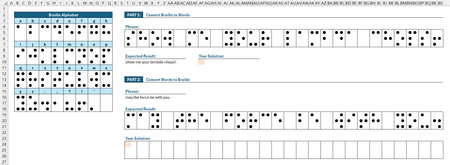

So I thought of doing something similar. I'm not sure how yours works/acts so maybe mine is the same or maybe it is different. Again, my Excel Labs is still not working on this computer :( so here is the formula based:
GridLookUp, LAMBDA(pattern,lookUpGrid,[returnGrid],[not_found],[step_rows],[step_cols],[options], LET(
   InRows, ROWS(pattern),
   InCols, COLUMNS(pattern),
   OutputArray, IF((COLUMNS(lookUpGrid)=COLUMNS(returnGrid))*(ROWS(lookUpGrid)=ROWS(returnGrid)), 1, 0),
   OutRows, (ROWS(pattern)-1)*OutputArray+1,
   OutCols, (COLUMNS(pattern)-1)*OutputArray+1,
   NFout, IF(ISOMITTED(not_found),"PATTERN NOT FOUND",not_found),
   stepRows, IF(step_rows,step_rows,InRows),
   stepCols, IF(step_cols,step_cols,InCols),
   FindLocations, MAKEARRAY(QUOTIENT(ROWS(lookUpGrid)-InRows,stepRows)+1,QUOTIENT(COLUMNS(lookUpGrid)-InCols,stepCols)+1,LAMBDA(x,y, PRODUCT(--(TAKE(DROP(lookUpGrid,(x-1)*stepRows,(y-1)*stepCols),InRows,InCols)=pattern)))),
   XYcount, SEQUENCE(ROWS(FindLocations)*COLUMNS(FindLocations),,0),
   XYlist, IF({1,0},QUOTIENT(XYcount,COLUMNS(FindLocations)),MOD(XYcount,COLUMNS(FindLocations)))+1,
   XYLocations, IF(SUM(FindLocations),FILTER(XYlist, INDEX(FindLocations,TAKE(XYlist,,1),TAKE(XYlist,,-1))),0),
   Return, IF(COLUMNS(XYLocations)-1,DROP(REDUCE("",SEQUENCE(ROWS(XYLocations)),LAMBDA(p,q,HSTACK(p,TAKE(DROP(returnGrid,(INDEX(XYLocations,q,1)-1)*IF(OutputArray,stepRows,1),(INDEX(XYLocations,q,2)-1)*IF(OutputArray,stepCols,1)),OutRows,OutCols)))),,1),NFout),
   IF(ISOMITTED(returnGrid),
      FindLocations,
      IF(Return<>0,Return,""))
   ))
so the idea is that it can take a [pattern] to match in a [lookUpGrid] and then if [returnGrid] is given it will return the corresponding location in that grid. Note, if that [returnGrid] is NOT the same dimensions as the [lookUpGrid] it will return a single cell (e.g. brail dot grid (3x2) can lookup on brail dot grid array (3i x 2j) and return from a corresponding table of letters/characters (i x j) ). Also if [returnGrid] is not provided a grid of 0/1 will be returned corresponding to the location(s) where the search pattern was found. NOTE: this will return ALL matches for the pattern (arranged in a stacked row). Another feature is the [step_rows] and [step_cols] so you can tell the search to step by a specific amount. So in the example where there is a row of characters between each line you can use a [step_rows] of 4 to skip over those spacer lines. You can also force a [step] of 1 to 'scan' all possible combinations of the search array for that pattern. I've tested a few different combinations and it seems pretty robust. Let me know what you think.
BTW. on line 12 I am just creating a list of all possible x,y coordinates and tried using the trick i leaned below to use IF( c, QUOTIENT, MOD) (value1, value2) but I kept getting a memory error because I was trying to create a 2d array using c => {1,0}. It worked fine when I declared them fully inside the IF but doing that trick to pass them as functions didn't work in this array version.
And although it isn't a specific optional output, the XYLocations function returns a list of where the pattern is found in a 2 column row-col table of values.
Here is an example of using it to find the first character (S) from the Answer key. I rewrote the letters in a single spaced grid. But if you take the overlapping grids (so the [returnGrid] is B3:Q18) you would still get S out but also with the other 5 cells of the offset 3x2 grid as shown just to the right of the highlighted cell (C25:D27).

In re: AFE/Labs
The demo workbook contains some malformed XML. I noticed the same thing with my copy. When I chose to move/copy the sheet out to a new workbook, AFE loaded without issue.
- djclementsAug 18, 2026Silver Contributor
Good catch. The AFE workbook module may have been corrupted when I purged my functions from the file. I have replaced the attachment on the original post with a clean copy. Thanks.
Cc: m_tarler
