Forum Discussion

Braille Translator Challenge
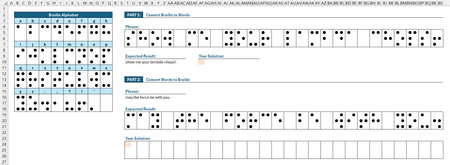

This discussion has inspired me to create a generalized function capable of locating a 2D array within a 2D array and returning a 2D array from the Moore neighborhood.
Excel has plenty of functions geared towards working with 1D arrays. Lookup functions return 1D arrays and shaping functions can return 2D arrays, but will only accept 1D array inputs.
What if the grid could be left as-is and a generalized function could still pull the return?
Consider this demo:
// Signature of draft

Navigate2Dλ=
LAMBDA(
    lookup_kernel,        // 2D array (Will also accept 1D arrays)
    match_array_2D,    // 2D arrays only
    [return_direction], // Moore neighborhood - 1 to 9. 5 is center. If omitted, defaults to 8 (below)
    [return_height],   // If these two parameters are omitted, defaults to height x width of the lookup kernel
    [return_width],
It's working smoothly so far. It's locating Cities using convolution windowing. I'll have more to share when it's finalized.

So I thought of doing something similar. I'm not sure how yours works/acts so maybe mine is the same or maybe it is different. Again, my Excel Labs is still not working on this computer :( so here is the formula based:
GridLookUp, LAMBDA(pattern,lookUpGrid,[returnGrid],[not_found],[step_rows],[step_cols],[options], LET(
   InRows, ROWS(pattern),
   InCols, COLUMNS(pattern),
   OutputArray, IF((COLUMNS(lookUpGrid)=COLUMNS(returnGrid))*(ROWS(lookUpGrid)=ROWS(returnGrid)), 1, 0),
   OutRows, (ROWS(pattern)-1)*OutputArray+1,
   OutCols, (COLUMNS(pattern)-1)*OutputArray+1,
   NFout, IF(ISOMITTED(not_found),"PATTERN NOT FOUND",not_found),
   stepRows, IF(step_rows,step_rows,InRows),
   stepCols, IF(step_cols,step_cols,InCols),
   FindLocations, MAKEARRAY(QUOTIENT(ROWS(lookUpGrid)-InRows,stepRows)+1,QUOTIENT(COLUMNS(lookUpGrid)-InCols,stepCols)+1,LAMBDA(x,y, PRODUCT(--(TAKE(DROP(lookUpGrid,(x-1)*stepRows,(y-1)*stepCols),InRows,InCols)=pattern)))),
   XYcount, SEQUENCE(ROWS(FindLocations)*COLUMNS(FindLocations),,0),
   XYlist, IF({1,0},QUOTIENT(XYcount,COLUMNS(FindLocations)),MOD(XYcount,COLUMNS(FindLocations)))+1,
   XYLocations, IF(SUM(FindLocations),FILTER(XYlist, INDEX(FindLocations,TAKE(XYlist,,1),TAKE(XYlist,,-1))),0),
   Return, IF(COLUMNS(XYLocations)-1,DROP(REDUCE("",SEQUENCE(ROWS(XYLocations)),LAMBDA(p,q,HSTACK(p,TAKE(DROP(returnGrid,(INDEX(XYLocations,q,1)-1)*IF(OutputArray,stepRows,1),(INDEX(XYLocations,q,2)-1)*IF(OutputArray,stepCols,1)),OutRows,OutCols)))),,1),NFout),
   IF(ISOMITTED(returnGrid),
      FindLocations,
      IF(Return<>0,Return,""))
   ))
so the idea is that it can take a [pattern] to match in a [lookUpGrid] and then if [returnGrid] is given it will return the corresponding location in that grid. Note, if that [returnGrid] is NOT the same dimensions as the [lookUpGrid] it will return a single cell (e.g. brail dot grid (3x2) can lookup on brail dot grid array (3i x 2j) and return from a corresponding table of letters/characters (i x j) ). Also if [returnGrid] is not provided a grid of 0/1 will be returned corresponding to the location(s) where the search pattern was found. NOTE: this will return ALL matches for the pattern (arranged in a stacked row). Another feature is the [step_rows] and [step_cols] so you can tell the search to step by a specific amount. So in the example where there is a row of characters between each line you can use a [step_rows] of 4 to skip over those spacer lines. You can also force a [step] of 1 to 'scan' all possible combinations of the search array for that pattern. I've tested a few different combinations and it seems pretty robust. Let me know what you think.
BTW. on line 12 I am just creating a list of all possible x,y coordinates and tried using the trick i leaned below to use IF( c, QUOTIENT, MOD) (value1, value2) but I kept getting a memory error because I was trying to create a 2d array using c => {1,0}. It worked fine when I declared them fully inside the IF but doing that trick to pass them as functions didn't work in this array version.
And although it isn't a specific optional output, the XYLocations function returns a list of where the pattern is found in a 2 column row-col table of values.
Here is an example of using it to find the first character (S) from the Answer key. I rewrote the letters in a single spaced grid. But if you take the overlapping grids (so the [returnGrid] is B3:Q18) you would still get S out but also with the other 5 cells of the offset 3x2 grid as shown just to the right of the highlighted cell (C25:D27).
- Patrick2788Aug 18, 2026Silver Contributor
In re: AFE/Labs
The demo workbook contains some malformed XML. I noticed the same thing with my copy. When I chose to move/copy the sheet out to a new workbook, AFE loaded without issue.
- djclementsAug 18, 2026Silver Contributor
Good catch. The AFE workbook module may have been corrupted when I purged my functions from the file. I have replaced the attachment on the original post with a clean copy. Thanks.
Cc: m_tarler
- djclementsAug 17, 2026Silver Contributor
Great stuff! Very interesting...
Regarding the trick with IF and eta-Lambda, it really only works when the logical_test argument receives a scalar, as you've well discovered.
Exception: it is possible to pass an array object when the numerator is a scalar...
=IF({1,0},QUOTIENT,MOD)(10,2)Or when using aggregate functions...
=IF({1,0},SUM,AVERAGE)(SEQUENCE(5))However, this currently only works as a single spill function (directly in the worksheet) and fails when nested within any of the Lambda helper functions.
For demonstration purposes, here's a few alternatives to your XYlist variable:
//Original:
   XYlist, IF({1,0},QUOTIENT(XYcount,COLUMNS(FindLocations)),MOD(XYcount,COLUMNS(FindLocations)))+1,

//Example 1 - defined as a function that calls a sub-function:
   XYlist, LAMBDA(f,IF({1,0},f(1),f(0)))(LAMBDA(b,IF(b,QUOTIENT,MOD)(XYcount,COLUMNS(FindLocations))+1)),

//Example 2 - using HSTACK and Lambda injection, rather than IF:
   XYlist, LAMBDA(f,HSTACK(f(QUOTIENT),f(MOD)))(LAMBDA(f,f(XYcount,COLUMNS(FindLocations))+1)),

//Example 3 - same idea, with a pre-defined sub-function:
   XYfunc, LAMBDA(f,f(XYcount,COLUMNS(FindLocations))+1),
   XYlist, HSTACK(XYfunc(QUOTIENT),XYfunc(MOD)),

//Example 4 - MAP over 2 broadcasted arrays (iterative):
   XYlist, MAP(IFNA(HSTACK(QUOTIENT,MOD),XYcount),IFNA(XYcount,{1,1}),LAMBDA(f,x,f(x,COLUMNS(FindLocations))+1)),

//Example 5 - GROUPBY with a horizontal vector of curried Lambda functions (also iterative):
   XYlist, DROP(GROUPBY(XYcount,XYcount,MAP(HSTACK(QUOTIENT,MOD),LAMBDA(f,LAMBDA(x,f(@x,COLUMNS(FindLocations))+1))),,0),1,1),
Hopefully something useful can be found in there. ;)
Kind regards.
