Forum Discussion

Braille Translator Challenge
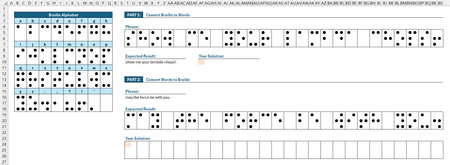

This was fun. I created a few LAMBDA functions to work together:
BrailRows,WRAPROWS(TOROW(HSTACK(B4:Q6,B8:Q10,B12:Q14,B16:Q18),,1),6),

BrailText,TAKE(WRAPROWS(HSTACK($B$3:$Q$3,$B$7:$Q$7,$B$11:$Q$11,$B$15:$Q$15),2),,1),

Brail2Char,LAMBDA(dots,IF((ROWS(dots)<>3)+(COLUMNS(dots)<>2),"*",INDEX(BrailText,XMATCH(6,MMULT(--(TOROW(dots,,1)=BrailRows),SEQUENCE(6,,,0)))))),

BrailLinesToText,LAMBDA(lines,IF((MOD(ROWS(lines),3)<>0)+(MOD(COLUMNS(lines),2)<>0),"*",CONCAT(MAKEARRAY(ROWS(lines)/3,COLUMNS(lines)/2,LAMBDA(r,c,Brail2Char(TAKE(DROP(lines,3*(r-1),2*(c-1)),3,2))))))),

Char2Brail,LAMBDA(c,IFERROR(LET(a,WRAPCOLS(CHOOSEROWS(BrailRows,XMATCH(c,BrailText)),3),IF(a=0,"",a)),"*")),

Line2Brail,LAMBDA(l,DROP(REDUCE("",MID(l,SEQUENCE(LEN(l)),1),LAMBDA(p,q,HSTACK(p,Char2Brail(q)))),,1)),
I apologize I didn't clean this up by my Excel Labs plug-in isn't working right now...
Basically
BrailRows is just a reference for the brail answer key formatted as rows
BrailText is the corresponding character for each row (i.e. make it easy to add more characters)
Brail2Char will take a single grid of dots and convert it to the corresponding character
BrailLinesToText will take a whole line or even multiple lines of Brail and convert it to a single string output
Char2Brail will output the Brail grid of dots give a character
Line2Brail will take a string of characters and output the line of Brail dots
here is an image of the results:
and on the right side in cell BU is using the input from the gray area just to show it can take multi-line input
I see a couple other answers have been submitted that look interesting, I will have to check them out too.
- djclementsAug 13, 2026Silver Contributor
I'm loving the interconnected functions... far from ordinary indeed! You even went above and beyond with Part 1 by accepting a multi-line Braille input. Beautifully done!
Interesting choice to leave the lookup table as an array of flattened Braille blocks... I had considered that approach as well but ultimately went another route. I'll wait a little longer to see if anyone else wants to take a stab at this before sharing my solution.
Glad you enjoyed it! Thanks for playing. :)
- m_tarlerAug 13, 2026Silver Contributor
actually I initially converted each block into a binary number but decided that extra step wasn't needed. I see others used ARRAYTOTEXT and I considered that but I know excel does matrix operations very efficiently and although it makes the 'code' simplier, I wasn't sure if adding that would make it more or less efficient over all. Not that mine is any model of efficiency.
