Forum Discussion

djclements
Aug 12, 2026Silver Contributor
Braille Translator Challenge
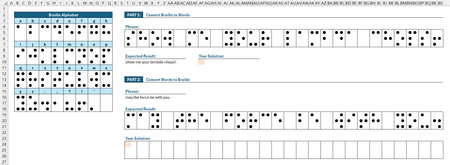
Using the Braille Alphabet lookup table provided: Part 1 - convert the given phrase from Braille to words. Part 2 - convert the given phrase from words to Braille. ✅ Solutions should be in the f...

IlirU
Aug 12, 2026Iron Contributor
Hi djclements,
(I have not used the LAMBDA function in my formula)
I applied the first formula to cell AF10.
=LET(
     data, B3:Q18,
   phrase, T5:BS7,
           CONCAT(XLOOKUP(BYCOL(WRAPCOLS(BYCOL(phrase, ARRAYTOTEXT), 2), ARRAYTOTEXT),
           HSTACK(BYCOL(WRAPCOLS(BYCOL(CHOOSEROWS(data, {2,3,4}), ARRAYTOTEXT), 2), ARRAYTOTEXT),
                  BYCOL(WRAPCOLS(BYCOL(CHOOSEROWS(data, {6,7,8}), ARRAYTOTEXT), 2), ARRAYTOTEXT),
                  BYCOL(WRAPCOLS(BYCOL(CHOOSEROWS(data, {10,11,12}), ARRAYTOTEXT), 2), ARRAYTOTEXT),
                  BYCOL(WRAPCOLS(BYCOL(CHOOSEROWS(data, {14,15,16}), ARRAYTOTEXT), 2), ARRAYTOTEXT)),
           HSTACK(
                  TOROW(CHOOSEROWS(data, 1), 1),
                  TOROW(CHOOSEROWS(data, 5), 1),
                  TOROW(CHOOSEROWS(data, 9), 1),
                  TOROW(CHOOSEROWS(data, 13), 1)
))))
The second formula is the same as the first formula, but instead of T5:BS7, T19:BS21 should be inserted in the formula.
Try it and let me know.
IlirU

djclements
Aug 12, 2026Silver Contributor
Nice job! It works perfectly for Part 1, converting Braille blocks into words.
The reverse procedure for Part 2 may be slightly more difficult. Best of luck, if you dare! ;)