Forum Discussion

Beginning of Month formula on ID
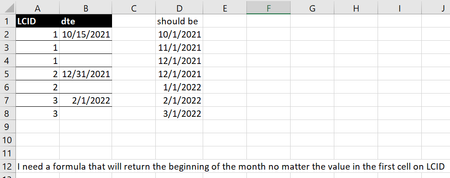
- Apr 13, 2022
Tony2021 Perhaps I got it right this time. I give up. Two dates don't seem to agree with yours, though.

Tony2021 See attached. Formulae in the green shaded area.

If the following date value is in the same month then I would need to use the next month (This example is not in the sample file I posted...only in my production file).
Example: date1 = 1/1/22 and date 2 = 1/31/22.
I would need the output to be 1/1/22 and 2/1/22
Essentially the months should be successive and on the 1st of every month
I actually do not need the test for blanks since in my production file there will not be a case of any blanks.
thank you very much!
- Riny_van_EekelenApr 12, 2022Platinum Contributor
Tony2021 Better to upload a file that resembles your real situation and indicate how the end result should look like.
- Tony2021Apr 12, 2022Steel Contributor
- Riny_van_EekelenApr 12, 2022Platinum Contributor
Tony2021 Well, the basic formula would be:
=EOMONTH(B2,-1)+1
It produces the same results as my first formula, but it doesn't return the results you want. I don't understand your logic for some of the dates. For instance B4. It contains the date of 30th of November and you want the formula to return the 1st of December. The next entry contains the 1st of December 2021 and "its beginning of the month" should become the 1st of January 2022. And there are others like that. Why?
Perhaps you made some typo's or mixed US and European date formatting.