Forum Discussion

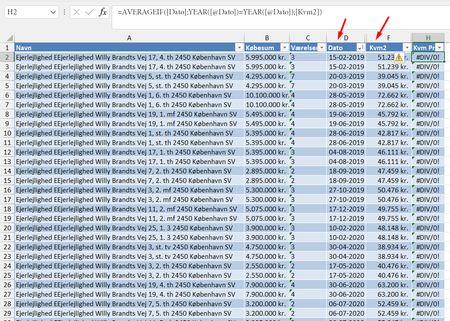
Average of a column, row by row, depending on a date (year)
 Dec 15, 2022
Try this one (Press Ctrl+Shift+Enter if not working in Excel 2021 or Excel 365):
=AVERAGE(IF(YEAR([@Dato])=YEAR([Dato]),[Kvm2]))

Hi mathetes
Thanks for the thorough response. I didn't know you could attach a copy. I have done so now.
The reason for doing it in a column in the table is because of charting purposes later on.
In any case, I tried your suggestion and got the same result. I can't tell by the averageif formula that I am doing something wrong.
Try this one (Press Ctrl+Shift+Enter if not working in Excel 2021 or Excel 365):
=AVERAGE(IF(YEAR([@Dato])=YEAR([Dato]),[Kvm2]))
- DonaldinhoDec 15, 2022Copper Contributor
That worked! I don't quite understand the difference between AVERAGEIF and nesting IF in AVERAGE, but this did the trick. Thank you so much.
- Patrick2788Dec 15, 2022Silver Contributor
Glad it worked for you!
The difference between AVERAGE and AVERAGEIF is how the two handle arrays.
For example,
Excel will not calculate this because it would mean the YEAR function pulling the year from each cell in F1 to F5 as an array. AVERAGEIF wants a range.
=AVERAGEIF(YEAR(F1:F5),J2,G1:G5)Excel will accept this:
=AVERAGE(IF(YEAR(F1:F5)=J2,G1:G5))