Forum Discussion

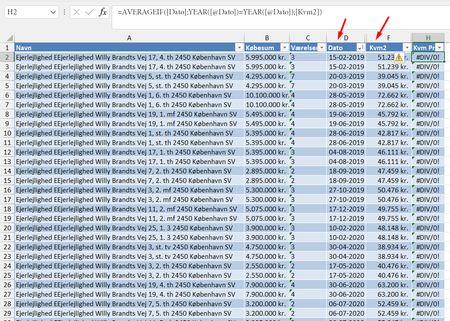
Average of a column, row by row, depending on a date (year)
 Dec 15, 2022
Try this one (Press Ctrl+Shift+Enter if not working in Excel 2021 or Excel 365):
=AVERAGE(IF(YEAR([@Dato])=YEAR([Dato]),[Kvm2]))

I am trying to create a column that will give me an average of column F, "Kvm2" depending on the year in Date column D, "Dato".
You're going about it in the wrong way. Don't create a column in the original table that does that. Take your AVERAGEIF function--the right one to use-- and put it off to the side. Next to it a column of the years covered by the full database
So say that table is in Columns M and N and the formula in N is something like this (your syntax is different from mine, so I can't be certain that this will work as written; counting on you to adapt it)
'=averageif(DATO];YEAR([@Dato])=M3;[Kvm2])
Then copy that formula down to the rest of the rows in N.
If you need more assistance, might I suggest posting a copy of the actual spreadsheet rather than just an image. If you can't post it here in the forum, use OneDrive or GoogleDrive and paste a link here granting edit access. That way we could both write and test a suggested format and layout.
 DonaldinhoDec 15, 2022Copper Contributor
Hi mathetes
Thanks for the thorough response. I didn't know you could attach a copy. I have done so now.
The reason for doing it in a column in the table is because of charting purposes later on.
In any case, I tried your suggestion and got the same result. I can't tell by the averageif formula that I am doing something wrong.
- Patrick2788Dec 15, 2022Silver Contributor
Try this one (Press Ctrl+Shift+Enter if not working in Excel 2021 or Excel 365):
=AVERAGE(IF(YEAR([@Dato])=YEAR([Dato]),[Kvm2]))- DonaldinhoDec 15, 2022Copper Contributor
That worked! I don't quite understand the difference between AVERAGEIF and nesting IF in AVERAGE, but this did the trick. Thank you so much.