Forum Discussion

Eko Hermanto
Jul 28, 2017Copper Contributor
Automatic Values with Criteria in Excel
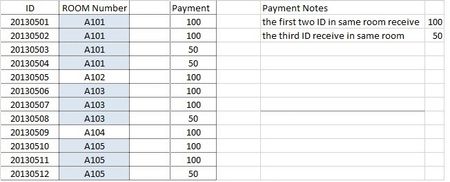
Greetings all, Kindly need your help please, i am quite new with excel and tried to find a formula to calculate on the payment (picture below). I had tried but still. I am really appreciate your ...

SergeiBaklan
Jul 28, 2017Diamond Contributor
Hi Eko,
Please clarify a bit what exactly you'd like to calculate. If how many ID:s in the same room received the same payment the easiest way is to use pivot table.
 Eko HermantoJul 28, 2017Copper Contributor
Dear Mr. Sergei,
Thank You for your reply, i wan't formula that calculate the person (in this case i put ID) on how much they will receive payments in 1 Room. If the room occupied 2 person/ID every person receive 100, but if the room occupied by 3 person/ID the third person/id receive only 50. I hope it's clarify, and i am sorry for the writing (still learning english also).
Thank you again Mr. Sergei.
- SergeiBaklanJul 28, 2017Diamond Contributor
When assuming your rooms are in column C starting from C4 into the payment you may use
=IF(COUNTIFS($C$4:$C4,$C4) <3,100,50)
above is in first cell with payment, copy the formula down for entire column