Forum Discussion

JosIrustaSolera
Jan 25, 2022Copper Contributor
Automatic reference to a worksheet
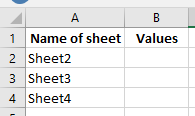
Hi everyone. My knowledge on Excel is quite poor, so forgive me if my question is dumb. What I need to do is to extract data from another workbook, and at a determined cell from an specific workshee...

HansVogelaar
Jan 25, 2022MVP
You can use the following formula in B2:
=INDIRECT("'[Workbook2]"&A2&"'!C"&ROW())and fill this down.
Warning: it will only work if Workbook2 is open in Excel. The INDIRECT function does not work with closed workbooks.

JosIrustaSolera
Jan 26, 2022Copper Contributor
Thank you for your quick reply. I could quite solve it yesterday using INDIRECT, ADDRESS, CONCATENATE (I didn't know that "&" could be used for the same), and REPLACE (to fix the way ADDRESS function gives the address). Though I didn't know that the book should be opened for it to work, that's a shame... I wonder if there's a way to solve it with another function that doesn't require the other book to be opened.