Forum Discussion

misrosudhir
Aug 18, 2017Copper Contributor
Automatic group by of data and creation of new work book
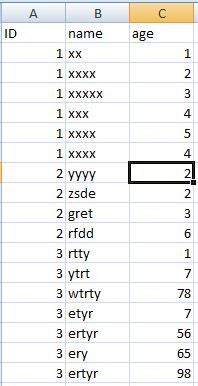
Hello Community, I have an excel file of employee details. I want to create a separate excel file for each employee consists data of that particular employee only. in this example i wan...

Brian Spiller
Sep 08, 2017Brass Contributor
I work through a similiar task by using Pivot Tables and the Show Report Filter Pages.
Since the files may be sent to other users and you don't want to send the entire Data set, you must deselect the Pivot Table option of "Save Source Data with File". Alternatively, on the resulting Filter Pages created, You can copy and paste special as values.
Then to get each the desired Tabs as a seperate File I use a macro. The Macro allows you select the destination folder and the files created will have the name of the Sheet copied. The Macro overwrites previous versions of the exported sheets files without warning.
'SpltSheets
Sub SplitSelectedWorkSheets()
    Dim ws As Worksheet
    Dim DisplayStatusBar As Boolean
    Dim DestinationPath As Variant

    With Application.FileDialog(msoFileDialogFolderPicker)
        .InitialFileName = ThisWorkbook.Path & "\"
        .Title = "Select a destination folder or create a new destination."
        .Show
        If .SelectedItems.Count = 0 Then
            MsgBox "Cancelled"
            Exit Sub
        Else
            'MsgBox .SelectedItems(1)
            DestinationPath = .SelectedItems(1)
        End If
    End With

    DisplayStatusBar = Application.DisplayStatusBar
    Application.DisplayStatusBar = True
    Application.ScreenUpdating = False
    Application.DisplayAlerts = False
    Application.StatusBar = ActiveWindow.SelectedSheets.Count & " Remaining Sheets"

    For Each ws In ActiveWindow.SelectedSheets
        Dim NewFileName As String

        'Macro-Enabled
        'NewFileName = ThisWorkbook.Path & "\" & ws.Name & ".xlsm"
        'Not Macro-Enabled
            NewFileName = DestinationPath & "\" & ws.Name & ".xlsx"
            ws.Copy
            'ActiveWorkbook.Sheets(1).Name = "Sheet1"
            'ActiveWorkbook.SaveAs Filename:=NewFileName, _
                FileFormat:=xlOpenXMLWorkbookMacroEnabled
            ActiveWorkbook.SaveAs Filename:=NewFileName, _
                FileFormat:=xlOpenXMLWorkbook
            ActiveWorkbook.Close SaveChanges:=False

    Next

    Application.DisplayAlerts = True
    Application.StatusBar = False
    Application.DisplayStatusBar = DisplayStatusBar
    Application.ScreenUpdating = True
    Close 'close all files and folders?
End Sub