Forum Discussion

Automate: Find matching pairs between 2 columns with comma separated values & then vlookup + delete
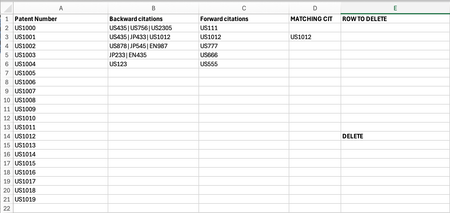
- Aug 23, 2024
zchahin
It could be done using FILTER function to sort out first the returned values in column D, then using the ISNUMBER and MATCH function from Column D, to identify which Patent Numbers was matched on column D.
formula for E2=LET(filteredValues, FILTER($D$2:$D$100, $D$2:$D$100<>""),IF(ISNUMBER(MATCH(A2, filteredValues, 0)), "DELETE", ""))
Sample file: zchahin.xlsxIf you're using an older version of excel
you'll need to add another column to achieve this, (or this could also be done by creating name range)array formula in E2:
=IFERROR(INDEX($D$2:$D$100, SMALL(IF($D$2:$D$100<>"", ROW($D$2:$D$100)-ROW($D$2)+1), ROW(1:1))), "")formula in F2:
=IF(ISNUMBER(MATCH(A2, $E$2:$E$100, 0)), "DELETE", "")


Excellent - thank you very much for a simple solution to my problem.
I wanted to clarify how to adjust the formula in column D so that if there are comma separated values in column C (spreadsheet initially attached contained single patent IDs in column C), it will return in column D the ID of the matching patent (between column B and C).
E.g. in the screenshot below citation FR2845889A1 is a match between column B and C but is not displayed in cell D10 (Column D formula you have provided works great when single citation is present in column C, which we are checking for a match in column B).


=XLOOKUP(TRUE,ISNUMBER(XMATCH(TEXTSPLIT(C2,"|"),TEXTSPLIT(B2,"|"))),TEXTSPLIT(C2,"|"),"")
Does this formula return the intended result?
- zchahinAug 26, 2024Copper Contributor
Works perfectly, thank you!
Only issue is my formula in column E no longer recognises the values in column D and therefore does not identify that they are present in column A and output delete in the corresponding row in corresponding column E (please see above).
Very grateful for your help so far.
- OliverScheurichAug 26, 2024Gold Contributor
You are welcome. I think the problem are the spaces for example there is " US1111" in cell D2 and "US1111" in cell A22. This doesn't return a match because of the leading space in cell D2 which isn't in A22 (in your sheet).
The reason for the entry in cell D2 is that you have e.g. "US1111 | US1234 | US1019" in columns B and C. In my example this would be "US1111|US1234|US1019" which means i have "|" instead of " | ".
With " | " in columns B and C you can use in D2:
=XLOOKUP(TRUE,ISNUMBER(XMATCH(TEXTSPLIT(C2," | "),TEXTSPLIT(B2," | "))),TEXTSPLIT(C2," | "),"")
In the attached sample file there is a worksheet for both "|" and " | ".
- zchahinAug 28, 2024Copper ContributorBrilliant, thank you!
I had one final question:
Is it possible to adapt the formula in column D of our initial problem, so that the output in column D is all the unique values from the coresponding column b cell. I.e remove the duplicated citation between column B and C. An e.g from your table would be for cell D2: matching citation in B2 and C2 = US9. Output in column D is US7 (values from column B minus the citation found to be present in both B2 and C2).
Again I am very grateful for your help.
