Forum Discussion

autofill date a training was completed by item/person
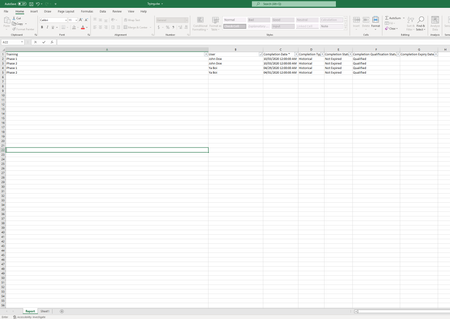
- Apr 14, 2022
Here's a possible solution. It does take advantage of the FILTER function, which is new and requires the most recent version of Excel.

Here's a possible solution. It does take advantage of the FILTER function, which is new and requires the most recent version of Excel.

I believe that this solution will work. I will be trying it in the next couple of hours and I will let your know. I want to be able to fully understand the formula so I can use it well.
Also, the "initial" part is a different training, like phase 1 and phase 2. In my example, no one completed the "initial" part of the training.
Once again, thank you. I truly appreciate that you spared some time to help me out.
- mathetesApr 14, 2022Gold Contributor
This is the key formula
=FILTER(Report!$C$2:$C$5,(Report!$A$2:$A$5=Sheet2!C$2)*(Report!$B$2:$B$5=Sheet2!$A3))
What this does is filter (from the table in the Report tab) the date column where the course equals the course named in row 2, the name equals the name in column A, and just display the date (which is in column C of the "Report" tab. This works in this case--and the multiple criteria can be used--because there's by definition only one date that is in the intersection of all those criteria. Otherwise, FILTER delivers a "dynamic array"--often multiple rows.
Since "Initial" is also a course, now that you've clarified that, you can simply copy the formula from one of the adjacent cells into that column.
Here's a video from which you can learn about the full power of FILTER. It's a relatively new function.
- ZoroBKApr 14, 2022Copper Contributor
Thank you very much for another thoughful reply.
on my "real" spreadsheet, i have people that have completed the same training twice on different dates.
is there away for us to display two dates in the same cell using the FILTER formula?
Or is there a better way to go about it?
Thank you!
- mathetesApr 14, 2022Gold Contributor
You wrote:
on my "real" spreadsheet, i have people that have completed the same training twice on different dates.
is there away for us to display two dates in the same cell using the FILTER formula?
Or is there a better way to go about it?
So let me ask,
- first, is there a valid reason why people might complete the same training twice? "Valid" not including, in my mind at least, "they failed the first time so took it again". In that case, I would think you'd only care about the final completion.
- However, if the data source is recording the failed attempt (or whatever the reason for there being multiple "completions" then I have another question: If they have indeed completed it twice (whatever the reason) do you WANT or NEED to display both dates in this summary? That does present its own complications, but if there's a reason, so be it. And no, it would not really be practical to display two dates in the same cell. It would be possible, but especially if it's the exception, it would be a case of the tail wagging the dog to make provision for it in all cases.
(By the way, personally I would think that only the most recent would matter for most purposes. Let the master database contain all the raw data, but a summary needn't get into the weeds that much.)