Forum Discussion

sirk78
Oct 02, 2023Copper Contributor
Autofill Data
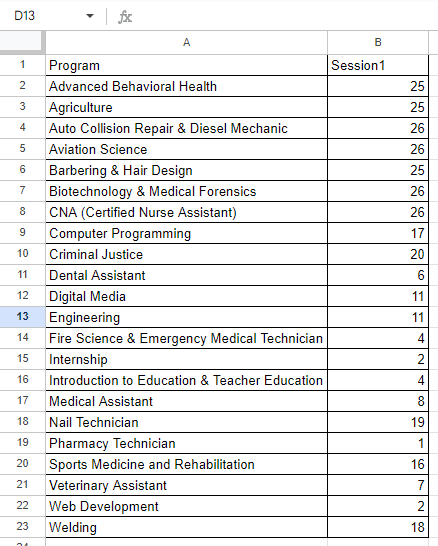
I am trying to speed up a process to autofill some data. I am looking to find a formula that will check to see if B2 is less than 27, if it is return the value of A2, if not go to B3 to see if it is...
 Oct 03, 2023
Thank you for the workbook.
Here's the formula. I treated this an 'unpacking' of the data. It's a bit longer because I had to avoid a circular reference with the totals in H.
=LET(
    counter, SEQUENCE(240),
    taken, COUNTIF(ProgramsBooked, program),
    available, 27 - taken,
    UnPack, LAMBDA(a, v, LET(resize, XLOOKUP(v, program, available, ""), VSTACK(a, EXPAND(v, resize, , v)))),
    Sessions_Available, DROP(REDUCE("", program, UnPack), 1),
    INDEX(Sessions_Available, counter)
)
.
Patrick2788
Oct 03, 2023Silver Contributor
Thank you for the workbook.
Here's the formula. I treated this an 'unpacking' of the data. It's a bit longer because I had to avoid a circular reference with the totals in H.
=LET(
    counter, SEQUENCE(240),
    taken, COUNTIF(ProgramsBooked, program),
    available, 27 - taken,
    UnPack, LAMBDA(a, v, LET(resize, XLOOKUP(v, program, available, ""), VSTACK(a, EXPAND(v, resize, , v)))),
    Sessions_Available, DROP(REDUCE("", program, UnPack), 1),
    INDEX(Sessions_Available, counter)
)
.

sirk78
Oct 03, 2023Copper Contributor
Awesome thank you, it seems it wasn't as straightforward as I had thought. I appreciate the time you put into this!
- Patrick2788Oct 03, 2023Silver ContributorYou're welcome! Glad I could help.