Forum Discussion

Autofill Data
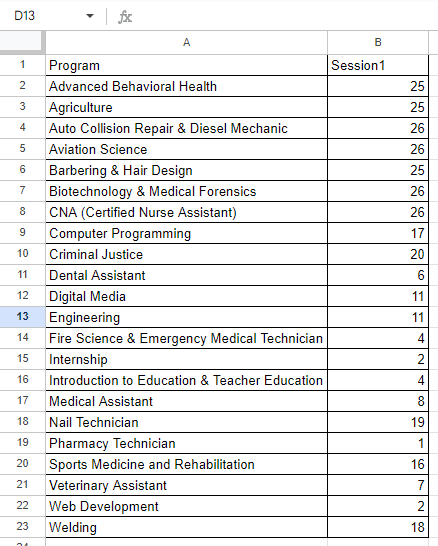
- Oct 03, 2023
Thank you for the workbook.
Here's the formula. I treated this an 'unpacking' of the data. It's a bit longer because I had to avoid a circular reference with the totals in H.
=LET(
    counter, SEQUENCE(240),
    taken, COUNTIF(ProgramsBooked, program),
    available, 27 - taken,
    UnPack, LAMBDA(a, v, LET(resize, XLOOKUP(v, program, available, ""), VSTACK(a, EXPAND(v, resize, , v)))),
    Sessions_Available, DROP(REDUCE("", program, UnPack), 1),
    INDEX(Sessions_Available, counter)
)
.

I initially thought that a =IF or =IFS statement would work but I am missing something. I was thinking of something like this =IF(B2<27, A2,(if not go to B3 and if <27 return A3, if not go to B4 and so on down the list).

- sirk78Oct 03, 2023Copper Contributor
Here is a modified version of the data. Some participants chose which program they wanted to attend but there are a lot that didn't which is why I have to fill in a program name. This can be random. As mentioned I can do this manually but it would save time if I could add a formula on row E327 to do as i have described previously and then drag it down to the end of the participant name list so that everyone is in a program but less than 27 in each program.
- Patrick2788Oct 03, 2023Silver Contributor
Thank you for the workbook.
Here's the formula. I treated this an 'unpacking' of the data. It's a bit longer because I had to avoid a circular reference with the totals in H.
=LET(
    counter, SEQUENCE(240),
    taken, COUNTIF(ProgramsBooked, program),
    available, 27 - taken,
    UnPack, LAMBDA(a, v, LET(resize, XLOOKUP(v, program, available, ""), VSTACK(a, EXPAND(v, resize, , v)))),
    Sessions_Available, DROP(REDUCE("", program, UnPack), 1),
    INDEX(Sessions_Available, counter)
)
.
- sirk78Oct 03, 2023Copper ContributorAwesome thank you, it seems it wasn't as straightforward as I had thought. I appreciate the time you put into this!