Forum Discussion

Auto Adjust cell color, if previous cell is bigger or smaller number.
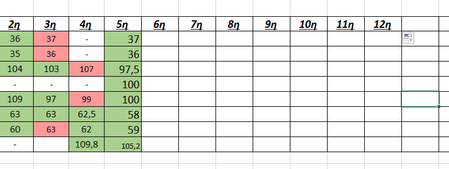
- Feb 21, 2023
Select the cells that you want to format. In the following, I will assume that C3 is the top left cell of the selection, and that it is the active cell in the selection.
On the Home tab of the ribbon, click Conditional Formatting > New Rule...
Select 'Use a formula to determine which cells to format'.
Enter the formula=NOT(AND(ISNUMBER(B3),C3>B3))
Remember, C3 is the active cell, and B3 is the cell to the left of that.
Click Format...
Activate the Fill tab.
Select Green.Repeat these steps, but with the formula
=AND(ISNUMBER(B3),C3>B3)
and Red.
Click OK, then click OK again.


Select the cells that you want to format. In the following, I will assume that C3 is the top left cell of the selection, and that it is the active cell in the selection.
On the Home tab of the ribbon, click Conditional Formatting > New Rule...
Select 'Use a formula to determine which cells to format'.
Enter the formula
=NOT(AND(ISNUMBER(B3),C3>B3))
Remember, C3 is the active cell, and B3 is the cell to the left of that.
Click Format...
Activate the Fill tab.
Select Green.
Repeat these steps, but with the formula
=AND(ISNUMBER(B3),C3>B3)
and Red.
Click OK, then click OK again.
- Antoniou_ThanasisFeb 21, 2023Copper Contributor
It Works! i also created 2 rules for empty or "-" cells to be default color. Check the image.
Thanks you very much