Forum Discussion

Attendance Spreadsheet Conundrum
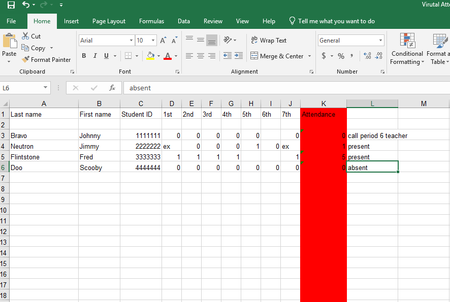
- Sep 09, 2020
Well, it sounds like you're kind of stuck with that situation. It's entirely possible that Excel's Power Query capability could work with the 85 sheets and deliver what you want. I do not have Power Query on my Mac (or if I do, I haven't been able to access it). So if that could work, I'll hope that one of the more qualified experts around here will chime in.
When the teachers are entering the data for each day, are they working with a sheet that lists all students already, in, say, alphabetical order, or are they also expected to enter the names?
Do all teachers get their attendance reports submitted on time such that you could, each Monday, say, produce the report for all prior periods?
How often are you expected to produce that output report you talk of: is it weekly?
If so, you could just do a copy and paste of the prior seven days and start building a single comprehensive database for all days in the past. It could look something like the attached. You'll see that I moved the names to the columns following the ID, but the only other change was to add a column for date.
If that's feasible, if you could create the consolidated sheet from the individual day sheets, then my next question would be "Do you have the most current version of Excel?" If you do, there are some new functions (notably FILTER) that could come in very handy for extracting the names of students who are exhibiting dangerous numbers of absences.


Well, it sounds like you're kind of stuck with that situation. It's entirely possible that Excel's Power Query capability could work with the 85 sheets and deliver what you want. I do not have Power Query on my Mac (or if I do, I haven't been able to access it). So if that could work, I'll hope that one of the more qualified experts around here will chime in.
When the teachers are entering the data for each day, are they working with a sheet that lists all students already, in, say, alphabetical order, or are they also expected to enter the names?
Do all teachers get their attendance reports submitted on time such that you could, each Monday, say, produce the report for all prior periods?
How often are you expected to produce that output report you talk of: is it weekly?
If so, you could just do a copy and paste of the prior seven days and start building a single comprehensive database for all days in the past. It could look something like the attached. You'll see that I moved the names to the columns following the ID, but the only other change was to add a column for date.
If that's feasible, if you could create the consolidated sheet from the individual day sheets, then my next question would be "Do you have the most current version of Excel?" If you do, there are some new functions (notably FILTER) that could come in very handy for extracting the names of students who are exhibiting dangerous numbers of absences.
- JBASSSep 09, 2020Copper Contributor
The students are in alphabetical order, but the actual students often change position in the spreadsheet due to enrollments and withdrawals. The teachers do not submit attendance on time consistently for various reasons, one of which is they have even more than usual on their plates due to the pandemic adjustments at school.
I am playing around with Power Query now and I think once I understand that, it will serve my purposes. I do have the latest version of Excel and when I wrap my head around proper use of Power Query that, too, will be helpful. Again, I appreciate you helping me crack this. Have a great day!