Forum Discussion

Assistance with a formula please
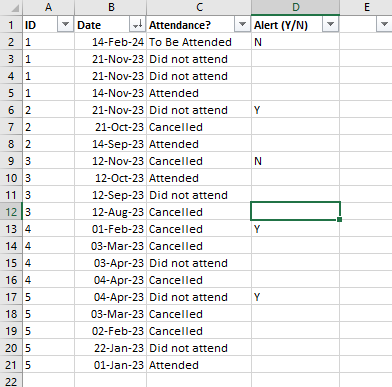

djclementsthank you for taking the time and trouble to get back to me - much appreciated.
I have tried your formula and I get a 'function not valid' error.
I have a terrible feeling it may be because I'm using Excel Professional 2019, not a more recent version, and I should have mentioned that in the first instance. I'm terribly sorry.
Given this restriction, can the formula you (kindly) suggested be amended in any way to fit this earlier version of Excel?
Many thanks.

Kralin Yes, the formulas used in my first reply will only work with Excel for MS365. Please see the newly attached version, which should be compatible with Excel 2019. It uses similar logic, but with helper columns in a structured table in order to minimize the number of calculations necessary to get the desired result. It's not as robust as the MS365 version, but still performs alright with up to 5000 rows of data. If your dataset is larger than that, you may want to set Calculation Options to Manual while working with your data, then switch back to Automatic (or Calculate Now) to refresh the results.
Again, the formulas will only work properly if the table has been sorted by ID from Smallest to Largest, then by Date from Newest to Oldest:
Home > Sort & Filter > Custom Sort
I hope that works out for you. Cheers!
- KralinDec 08, 2023Copper Contributor
djclementsthanks once more for taking the time and trouble to reply. For some reason your solution wasn't accepted in 2019 - or the version we have at work, anyway. Most perplexing. Please don't worry about another solution, I'll just apply my thinking hat and try to get to the data in another way.
Thanks again.
- djclementsDec 09, 2023Silver Contributor
Kralin No worries. If you don't mind me asking, though, what about it didn't work? What kind of errors were you getting? Just wondering because I tested it on my old laptop with Office 2010 and it worked fine. One thing worth mentioning, if you edit the formula in the "Last1" or "Last2" columns, you'll need to press Ctrl+Shift+Enter, otherwise they'll return #N/A errors. Also, if you're trying to transfer the formulas over to another workbook, you'll need to create the two defined names, "CellAbove" and "PreviousID", in the other workbook using Name Manager. If you need help with that, let me know.
Kind Regards.