Forum Discussion

PAIGEME723
Apr 13, 2023Copper Contributor
Assign a value based on two columns of criteria that each contain wildcards?
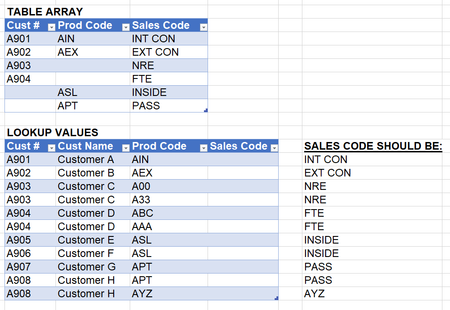
I am trying to assign a sales code to each sales line based on the customer and/or product code. So, I want to assign a sales code based on either 1. the customer number, 2. the product code or 3. bo...

OliverScheurich
Apr 13, 2023Gold Contributor
=IFERROR(IFERROR(IFERROR(INDEX($C$2:$C$7,MATCH(1,($A$2:$A$7=A10)*($B$2:$B$7=C10),0)),INDEX($C$2:$C$7,MATCH(A10,$A$2:$A$7,0))),INDEX($C$2:$C$7,MATCH(C10,$B$2:$B$7,0))),C10)You can try this formula. Enter the formula with ctrl+shift+enter if you don't work with Office 365 or Excel 2021.

PAIGEME723
Apr 13, 2023Copper Contributor
OliverScheurich Thank you! I plugged it into my sheet and it looks like there is one scenario I am getting an incorrect sales code for. The first two rows need to be "and" but its calculating as "or". So if the data in my lookup table has one or the other, its giving me the sales code, but I need to original product code (since both criteria are not true). Hopefully that makes sense!
- OliverScheurichApr 13, 2023Gold Contributor
=IFERROR(IFERROR(IFERROR(INDEX($C$2:$C$3,MATCH(1,($A$2:$A$3=A10)*($B$2:$B$3=C10),0)),INDEX($C$4:$C$5,MATCH(A10,$A$4:$A$5,0))),INDEX($C$6:$C$7,MATCH(C10,$B$6:$B$7,0))),C10)You are welcome. This formula returns the intended result in my sheet. The formula has to be entered with ctrl+shift+enter if one doesn't work with Office 365 or Excel 2021.