Forum Discussion

tytds
Feb 02, 2022Copper Contributor
Apply different date filters to specific column values in a pivot table
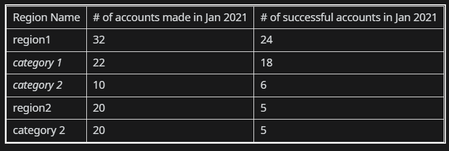
Suppose I have the following pivot table from one data source The source data is essentially a spreadsheet of accounts which indicates 3 items (3 columns)- date account was created, date ...

SergeiBaklan
Feb 02, 2022Diamond Contributor
tytds
not sure I understood entire logic. For such sample
- creating PivotTable add data to data model
- add Date (Calendar) table with PowerPivot or Power Query
- make relationship between it and main table on Date <=> Made
- add measures as
accounts made:=COUNTROWS ( Table1 )

accounts success:=VAR mindate =
    MIN ( 'Calendar'[Date] )
VAR maxDate =
    MAX ( 'Calendar'[Date] )
RETURN
    CALCULATE (
        COUNTA ( Table1[Success] ),
        'Calendar'[Date] >= mindate
            && 'Calendar'[Date] <= maxDate
    )


accounts bought:=VAR mindate =
    MIN ( 'Calendar'[Date] )
VAR maxDate =
    MAX ( 'Calendar'[Date] )
RETURN
    CALCULATE (
        COUNTA ( Table1[Bought] ),
        'Calendar'[Date] >= mindate
            && 'Calendar'[Date] <= maxDate
    )
samridhi475
Feb 02, 2022Copper Contributor
corect
 tytdsFeb 02, 2022Copper Contributorhmm i thought this would be an easier process. I don't want to play around with too much code but this date discrepancy is giving me a problem and I can't present my report accurately.
- SergeiBaklanFeb 03, 2022Diamond Contributor
If to continue it's better if you generate small sample file to illustrate the logic manually adding desired result. That's 5-10 minutes job, your actual data is not required.
- tytdsFeb 03, 2022Copper ContributorHere is a sample of the source data
https://easyupload.io/zlogle