Forum Discussion

tytds
Feb 02, 2022Copper Contributor
Apply different date filters to specific column values in a pivot table
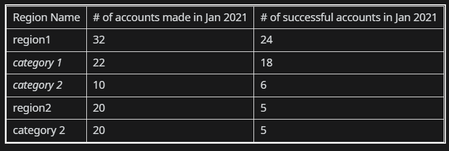
Suppose I have the following pivot table from one data source The source data is essentially a spreadsheet of accounts which indicates 3 items (3 columns)- date account was created, date ...

SergeiBaklan
Feb 02, 2022Diamond Contributor
tytds
not sure I understood entire logic. For such sample
- creating PivotTable add data to data model
- add Date (Calendar) table with PowerPivot or Power Query
- make relationship between it and main table on Date <=> Made
- add measures as
accounts made:=COUNTROWS ( Table1 )

accounts success:=VAR mindate =
    MIN ( 'Calendar'[Date] )
VAR maxDate =
    MAX ( 'Calendar'[Date] )
RETURN
    CALCULATE (
        COUNTA ( Table1[Success] ),
        'Calendar'[Date] >= mindate
            && 'Calendar'[Date] <= maxDate
    )


accounts bought:=VAR mindate =
    MIN ( 'Calendar'[Date] )
VAR maxDate =
    MAX ( 'Calendar'[Date] )
RETURN
    CALCULATE (
        COUNTA ( Table1[Bought] ),
        'Calendar'[Date] >= mindate
            && 'Calendar'[Date] <= maxDate
) samridhi475Feb 02, 2022Copper Contributorcorect
 tytdsFeb 02, 2022Copper Contributorhmm i thought this would be an easier process. I don't want to play around with too much code but this date discrepancy is giving me a problem and I can't present my report accurately.
- SergeiBaklanFeb 03, 2022Diamond Contributor
If to continue it's better if you generate small sample file to illustrate the logic manually adding desired result. That's 5-10 minutes job, your actual data is not required.
- tytdsFeb 02, 2022Copper Contributor
The columns would be months on the pivot table and there would be different years as the row labels
Also, your pivot table above is not accurate (there should be 0 successful accounts in Jan 2021)