Forum Discussion

Another Issue with previous row/column references
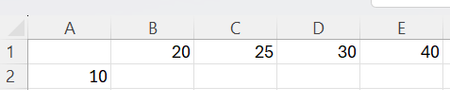
- Jul 10, 2024
TheDub For a single row of data, the SCAN function can be used with cell A2 as the initial_value and range B1:E1 as the array:
=SCAN(A2, B1:E1, LAMBDA(a,v, v-a))This can be copied down in column B as needed, to apply the function to multiple rows. However, if you want a single dynamic array formula to cascade downwards, spilling an array of arrays, it gets a bit more complicated. One possible solution is to use TEXTJOIN to store the results of each row, then TEXTSPLIT to access the data from the previous row:
=LET(
    results, SCAN(TEXTJOIN("|",, B1:E1), A2:A5, LAMBDA(a,v, TEXTJOIN("|",, SCAN(v, TEXTSPLIT(a, "|"), LAMBDA(p,c, c-p))))),
    --TEXTBEFORE(TEXTAFTER("|" & results & "|", "|", SEQUENCE(, COLUMNS(B1:E1))), "|")
)
The results of the double-SCAN will return a single column of delimited text strings...
Delimited Results
...which are then split into the final 2D array using TEXTBEFORE and TEXTAFTER.
Final Results


First - to Harun24HR: thanks for the answer; seems djclements beat you by about 10 minutes (and added something I'll get back to below) so he should get the credit for best response.
Second - to myself: a strong and loud for not thinking about SCAN(); hopefully this won't happen again (but I doubt it...)
Third - to djclements: thanks for you answer. Yes, I was indeed thinking about the next step: using the answer (once I have it) dynically over a number of rows with different starting values; I just usually like to ask about one issue at the time in order to keep it in focus. But now that you brought that up - yes, that works too (and thanks again). I have to say, though, that I hate that Excel makes us use crutches like TEXTJOIN()/TEXTSPLIT() (and their cousin from a different grandmother - FILTERXML()....) just to avoid the dreaded array-of-array issue. It would interesting to see if @Peter Bartholomew could unleash his thunks on this (although I'm not sure I entirely - or partially - understand them either).
Which brings us to the next interesting variation on this: in your answer the reference row/the array being SCANned is always Row 1. What if we wanted to make that dynamic as well, so that each row scans the row immediately above it (or even, perish the thought, the Nth row about it)? Is that going to be an array-or-arrays-of-arrays problem ?
?
- djclementsJul 11, 2024Silver Contributor
TheDub I wholeheartedly agree with you that the workarounds for the dreaded array of arrays issue are often cumbersome and not exactly easy to master for the average user. I suspect there would be a THUNKS variation for this scenario as well but haven't gone down that rabbit hole yet. If anyone can figure it out, though, it'll be PeterBartholomew1 for sure!
Just to clarify, the dynamic array formula I shared in my first response does in fact loop through each row, scanning the row immediately above it. If you wanted a variant that always scans the top row while looping through the values in column A, it would be very similar but with MAP replacing the first SCAN function:
=LET(
    results, MAP(A2:A5, LAMBDA(v, TEXTJOIN("|",, SCAN(v, B1:E1, LAMBDA(p,c, c-p))))),
    --TEXTBEFORE(TEXTAFTER("|" & results & "|", "|", SEQUENCE(, COLUMNS(B1:E1))), "|")
)
Alternatively, the REDUCE / VSTACK method could be used to always reference the top row:
=DROP(REDUCE(B1:E1, A2:A5, LAMBDA(a,v, VSTACK(a, SCAN(v, B1:E1, LAMBDA(p,c, c-p))))), 1)Or, to always reference the previous row:
=DROP(REDUCE(B1:E1, A2:A5, LAMBDA(a,v, VSTACK(a, SCAN(v, TAKE(a, -1), LAMBDA(p,c, c-p))))), 1)Or, to always reference the nth row above:
=LET(
    n, 2,
    DROP(REDUCE(B1:E1, A2:A5, LAMBDA(a,v, VSTACK(a, SCAN(v, TAKE(TAKE(a, -n), 1), LAMBDA(p,c, c-p))))), 1)
)
However, I typically would only recommend using this method as a last resort, due to its poor performance with medium to large datasets.
Please see the attached files if needed, which contains all of the examples mentioned thus far...
- PeterBartholomew1Jul 11, 2024Silver Contributor
Though I would try to apply some 'previously prepared ingredients' to this challenge. My worksheet formula is simply
= SCANVλ(initRow,initCol,
    LAMBDA(priorRow, init,
        SCAN(init, priorRow, LAMBDA(acc, v, v - acc))
    )
  )
The Lambda function calculates the row that follows 'priorRow'. What is hidden is that the wrapper function SCANVλ modifies the Lambda function to cause it to return thunks before passing it to the real SCAN Lambda helper function.
Pretty much all problems of interest will have an array of arrays within its solution. Although Excel fails to handle an array of arrays [TYPE 64], it will accept an array of functions [TYPE 128], including but not limited to, thunks. The function is executed once its parameter string is provided and may return an array at that point.
The SCANVλ Lambda function has the same signature as SCAN but hides complexity from the user.
/*  FUNCTION NAME:  SCANVλ
    DESCRIPTION:    Implements a version of SCAN that will return a column of arrays */
/*  REVISIONS:      Date            Developer           Description
                    19 May 2024     Peter Bartholomew   Original Development
*/

SCANVλ = LAMBDA(
//  Parameter Declarations
    [y₀], [x], [FNλ],
//  Procedure
    LET(help,       TRIM(TEXTSPLIT(
                        "DESCRIPTION:   →Implements a version of SCAN that will return an column of arrays.¶" &
                        "VERSION:       →19 May 2024 ¶" &
                        "PARAMETERS:    →¶" &
                        "  y₀           →(Required) A row vector of initial values. ¶" &
                        "  x            →(Required) A two dimensional array of values. ¶" &
                        "  fnλ          →(Required) A lambda function that accepts a row array as input.",
                        "→", "¶" )
                    ),
    //  Check inputs
        y₀,     IF(OR(ISOMITTED(y₀), y₀=""), #Value!, y₀),
        x,      IF(OR(ISOMITTED(x),  x= ""), #Value!, x),
        fnλ,    IF(OR(ISOMITTED(fnλ), TYPE(fnλ)<>128),  #Value!, fnλ),
    //  Procedure
        n,      ROWS(x),
        Fλ, LAMBDA(yϑ, x,
            LET(y, yϑ(),
                z, FNλ(y, x),
                zϑ, THUNK(z),
                zϑ )
            ),
        yϑ₀, THUNK(y₀),
        thunkArrayϑ, SCAN(yϑ₀, x, Fλ),

    //  Recombine pairs of thunks as a binary tree until the root node is reached
        k,              SEQUENCE(LEN(BASE(n - 1, 2))),
        recombinedϑ,    @REDUCE(thunkArrayϑ, k, JOINPAIRSλ),
        result,         recombinedϑ(),
        //  Handle Error
        error,          MAX(IsError(result)+1),
        //  Return result
        CHOOSE(error, result, Help)
    )
);


/*  FUNCTION NAME:  JOINPAIRSλ
    DESCRIPTION:    Called by BYROW to stack the contents of thunks pairwise */
/*  REVISIONS:      Date            Developer           Description
                    09 May 2024     Peter Bartholomew   Original Development
                    16 May 2024     Peter Bartholomew   Test for unpaired thunk
*/
JOINPAIRSλ
= LAMBDA(thunkArray, [k],
    LET(

        alternate, WRAPROWS(thunkArray, 2, thunk("")),
        firstpart, TAKE(alternate, , 1),
        finalpart, TAKE(alternate, , -1),

        MAP(
            firstpart,
            finalpart,
            LAMBDA(ϑ₁, ϑ₂,
                LET(
                    x₁, (@ϑ₁)(),
                    x₂, (@ϑ₂)(),
                    v, IF(@x₂="", x₁, VSTACK(x₁, x₂)),
                    LAMBDA(v)
                )
            )
        )
    )
);


THUNK
= LAMBDA(x, LAMBDA(x));
Besides building an array of thunks that contain elements of the solution, SCANVλ combines the thunk array as a binary tree until only a single thunk (containing the entire solution) remains.
If it makes anyone feel better about this, it took be an age to develop it and rederiving it from scratch would still be challenging.
- TheDubJul 12, 2024Iron Contributor
I'm still digesting your and djclements' second answer, but in the interim
If it makes anyone feel better about this, it took be an age to develop it and rederiving it from scratch would still be challenging.
I'll take that to feel better!
